

FluentCommunity Video Calls v4.0.0 🎥📞🔴
Jitsi • Zoom • Google Meet • Webex • Whereby • Live Tips • Analytics
✨ New: Hosts can earn money during live sessions with the built-in Live Tips feature, allowing members to send instant tips and donations while meetings are in progress.
Perfect for coaches, creators, educators, consultants, and community owners who want to host meetings and monetize live events—all without leaving their community.
Bring meetings, classes, coaching sessions, webinars, and real-time collaboration directly into your FluentCommunity-powered website.
FluentCommunity Video Calls is a powerful video conferencing add-on built exclusively for FluentCommunity. It enables community members to create, schedule, join, and manage live meetings without leaving your website.
With support for Jitsi Meet, Zoom, Google Meet, Cisco Webex, and Whereby, you can choose the provider that best fits your community while keeping every meeting connected to your FluentCommunity Spaces.
Beyond video conferencing, the plugin introduces live tipping, attendance tracking, meeting analytics, provider scheduling, live meeting indicators, embedded meeting pages, and advanced space-level controls, making it one of the most complete communication solutions available for FluentCommunity.
About The Plugin
FluentCommunity Video Calls transforms every FluentCommunity Space into a modern collaboration hub.
Whether you're running a membership website, online school, coaching platform, private community, remote team, or customer portal, members can communicate through live video meetings without being redirected to external websites.
Administrators can decide which provider each Space uses, configure permissions, schedule meetings, monitor participation, and even allow members to financially support hosts during live sessions through integrated tipping.
Everything stays organized inside FluentCommunity, creating a seamless community experience.
What's New
This release introduces major upgrades that significantly expand the plugin beyond traditional video meetings.
New Multi-Provider Support
Choose from multiple meeting providers:
- Jitsi Meet
- Zoom
- Google Meet
- Cisco Webex
- Whereby
Each provider includes its own scheduling tools, meeting indicators, and provider-specific integrations.
Live Tips & Creator Support
Members can financially support meeting hosts while sessions are live(Only for Jitsi, Zoom & Whereby).
Perfect for:
- Coaches
- Trainers
- Teachers
- Content creators
- Mentors
- Guest speakers
- Community events
Features include:
- Live tipping
- Real-time notifications
- Tip history
- Meeting tip records
- Host earnings support
- Fluentcart is needed for Live Tip
Google Meet Integration
Create and manage Google Meet sessions directly inside FluentCommunity.
Includes:
- Scheduled meetings
- Meeting links
- Calendar-ready scheduling
- Live indicators
- Space integration
Cisco Webex Integration
Host professional meetings with Webex.
Supports:
- Scheduled meetings
- Meeting management
- Space integration
- Live meeting status
Whereby Integration
Simple browser-based meetings with Whereby.
Features include:
- Embedded rooms
- Scheduled sessions
- Live indicators
- Easy member access
Core Features
Multiple Video Providers
Unlike traditional meeting plugins, you are not locked into a single provider.
Supported platforms include:
- Jitsi Meet
- Zoom
- Google Meet
- Cisco Webex
- Whereby
Each Space can be configured independently.
Native FluentCommunity Experience
Members never have to search through emails for meeting links.
Everything lives inside your community:
- Meeting pages
- Space announcements
- Live badges
- Join buttons
- Meeting history
- Activity updates
One-Click Meeting Creation
Create meetings directly from FluentCommunity.
Perfect for:
- Community discussions
- Live classes
- Weekly meetings
- Team collaboration
- Workshops
- Office hours
Meeting Scheduling
Schedule meetings in advance with supported providers.
Members instantly know:
- Date
- Time
- Provider
- Meeting status
- Join availability
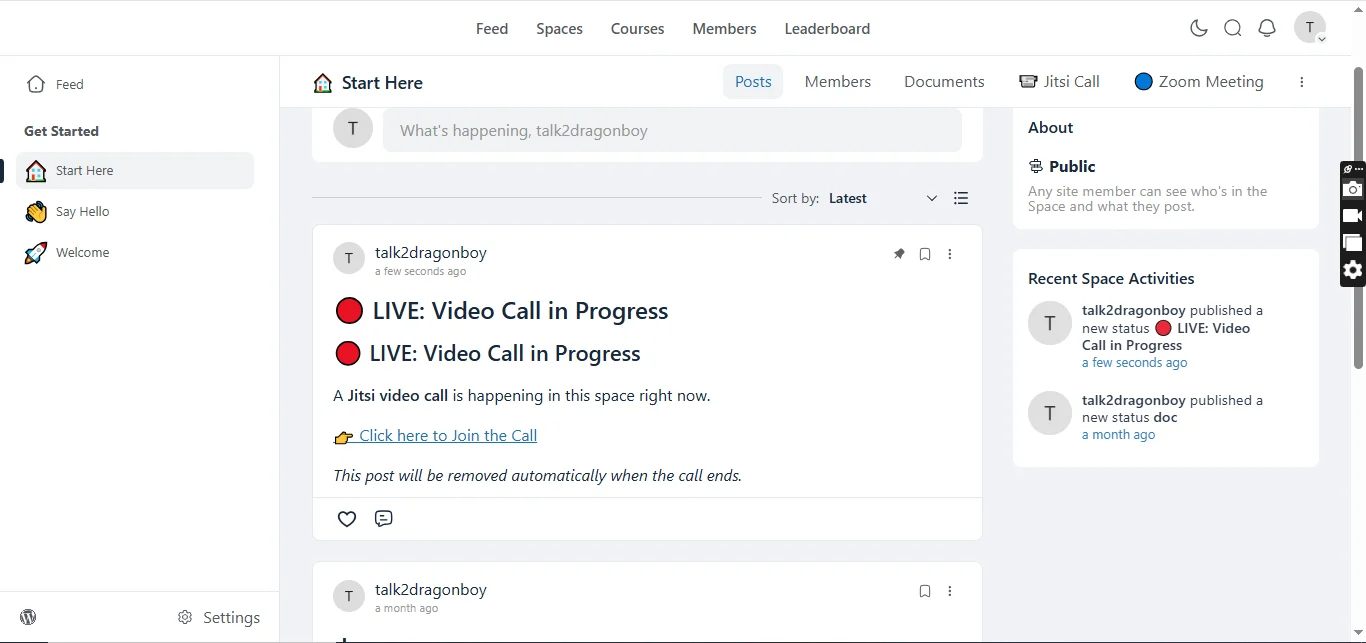
Live Meeting Indicators
Community members immediately see when a Space is active.
Displays include:
- LIVE badge
- Scheduled meeting badge
- Active meeting status
- Join now button
Attendance Tracking
Automatically monitor meeting participation.
Track:
- Join time
- Attendance
- Active participation
- Meeting history
Embedded Video Experience
Meetings can open:
- Embedded inside FluentCommunity
- Dedicated meeting pages
- Full-screen mode
- New browser tab
Per-Space Controls
Every Space can have its own configuration.
Administrators can:
- Enable or disable meetings
- Select meeting provider
- Configure room settings
- Restrict permissions
- Customize meeting behavior
Provider Scheduling
Schedule meetings for:
- Zoom
- Google Meet
- Webex
- Whereby
Keep members informed without leaving FluentCommunity.
Automatic Meeting Rooms
Automatically generate unique rooms based on your Space identity.
Benefits include:
- No room conflicts
- Cleaner organization
- Better privacy
- Consistent meeting links
Custom Room Names
Create memorable meeting rooms.
Supports:
- Custom names
- Private rooms
- Protected rooms
- Organization branding
Live Notifications
Keep members informed with automatic updates.
Notifications include:
- Meeting scheduled
- Meeting starting
- Live session alerts
- Provider updates
- Community announcements
Meeting Analytics
Understand how your community uses live meetings.
View:
- Meeting activity
- Attendance statistics
- Provider usage
- Active Spaces
- Community engagement
REST API
Developer-friendly REST endpoints make it easy to extend the plugin.
Includes APIs for:
- Meeting status
- Room information
- Heartbeats
- Active sessions
- Provider data
Role-Based Permissions
Control access using FluentCommunity roles.
Support for:
- Administrators
- Moderators
- Space managers
- Members
Self-Hosted Ready
Choose the deployment that matches your infrastructure.
Supports:
- Public Jitsi
- Self-hosted Jitsi
- 8x8 JaaS
- Cloud providers
Benefits
Keep Members Engaged
Instead of sending users across multiple services, every meeting stays connected to your community.
Support Multiple Meeting Platforms
Different organizations use different providers.
This plugin lets you choose the right platform without changing your community workflow.
Monetize Live Events
Allow community members to support hosts through live tips.
Perfect for:
- Paid communities
- Coaches
- Educators
- Creators
- Mentors
Improve Community Engagement
Real-time conversations increase:
- Member retention
- Participation
- Learning outcomes
- Community activity
Built for Learning Platforms
Excellent for:
- Online schools
- Membership sites
- Training organizations
- Coaching businesses
- Study groups
Enterprise Ready
Use enterprise-grade providers like:
- Zoom
- Webex
- Google Meet
or choose the flexibility of:
- Jitsi
- Whereby
Flexible Deployment
Run meetings using free public services or your own infrastructure for complete control over branding, privacy, and performance.
Perfect For
- Online Communities
- Membership Websites
- Coaching Businesses
- Learning Management Systems
- Universities
- Schools
- Study Groups
- Corporate Teams
- Customer Communities
- Internal Collaboration
- Webinars
- Live Workshops
- Community Events
- Support Communities
- Creator Communities
Requirements
- WordPress 6.0+
- PHP 7.4+
- FluentCommunity
- At least one configured meeting provider
Changelog
Version 4.0.0
New
- Added Google Meet integration
- Added Cisco Webex integration
- Added Whereby integration
- Added live tipping system for meeting hosts
- Added meeting tip notifications
- Added tip recording and history
- Added provider-specific schedulers
- Added Google Meet scheduled meeting indicators
- Added Webex scheduled meeting indicators
- Added Whereby scheduled meeting indicators
- Added Whereby live meeting indicator
- Expanded provider management framework
- Improved meeting analytics
- Enhanced REST API support
- Improved permission handling
- Better room management utilities
- Improved meeting status tracking
Improved
- Faster provider loading
- Better meeting scheduling workflow
- Improved Space integration
- Better meeting management
- Enhanced administrator controls
- Improved user experience
- Optimized performance
- Cleaner provider architecture
Fixed
- Various UI improvements
- General stability improvements
- Improved compatibility with newer FluentCommunity versions
- Minor bug fixes and code optimizations
🎉 Launch Offer: Get it for just $50 Lifetime Deal(unlimited years, unlimited sites, 5 years full support and updates), if you're among the first 10 buyers. After that, the price increases.
https://www.youtube.com/watch?v=nZolSvG4TYE
👇👇Grab yours now
Don't miss your chance to be one of the first 10!
https://www.youtube.com/watch?v=jA-YaSh92SY
For Support: visit Mpaddi.com
Image 1:
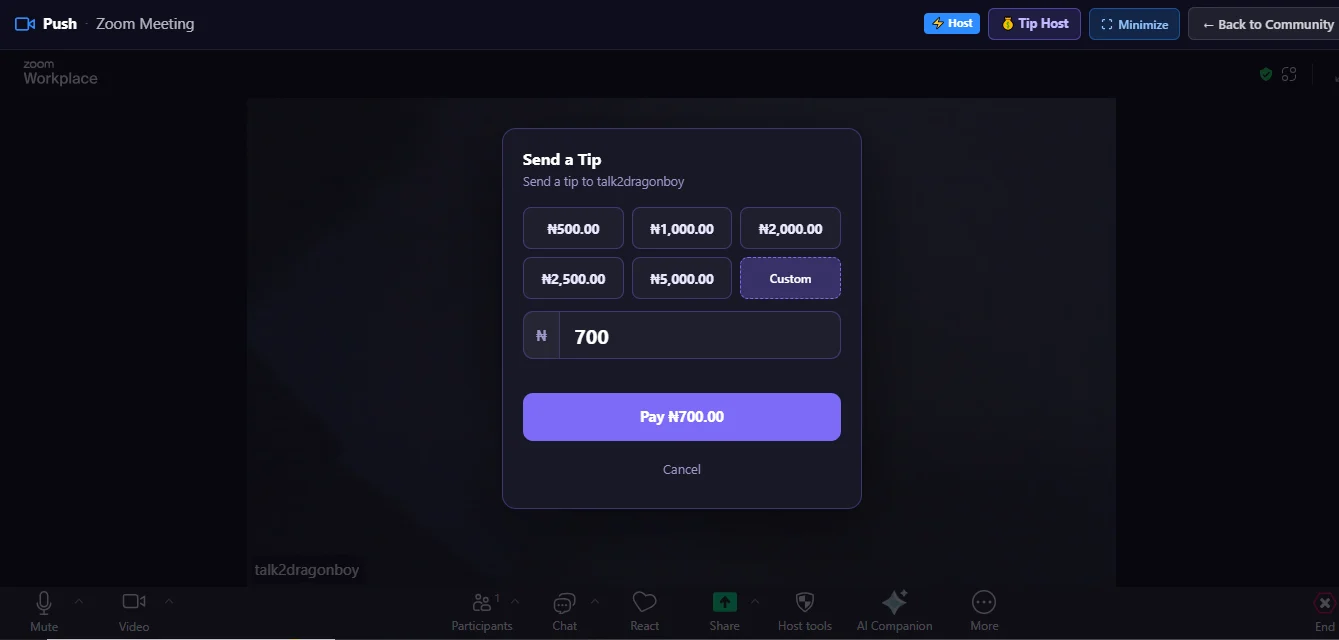
Image 2:
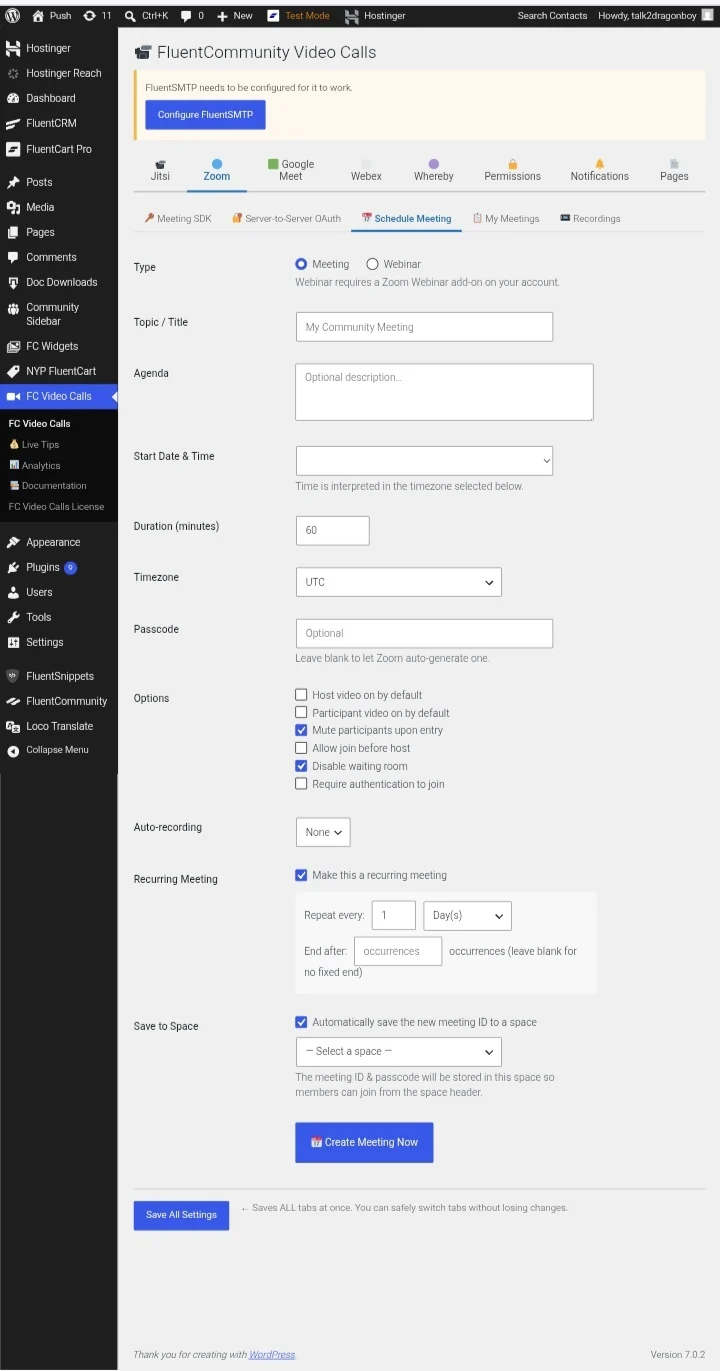
Image 3:
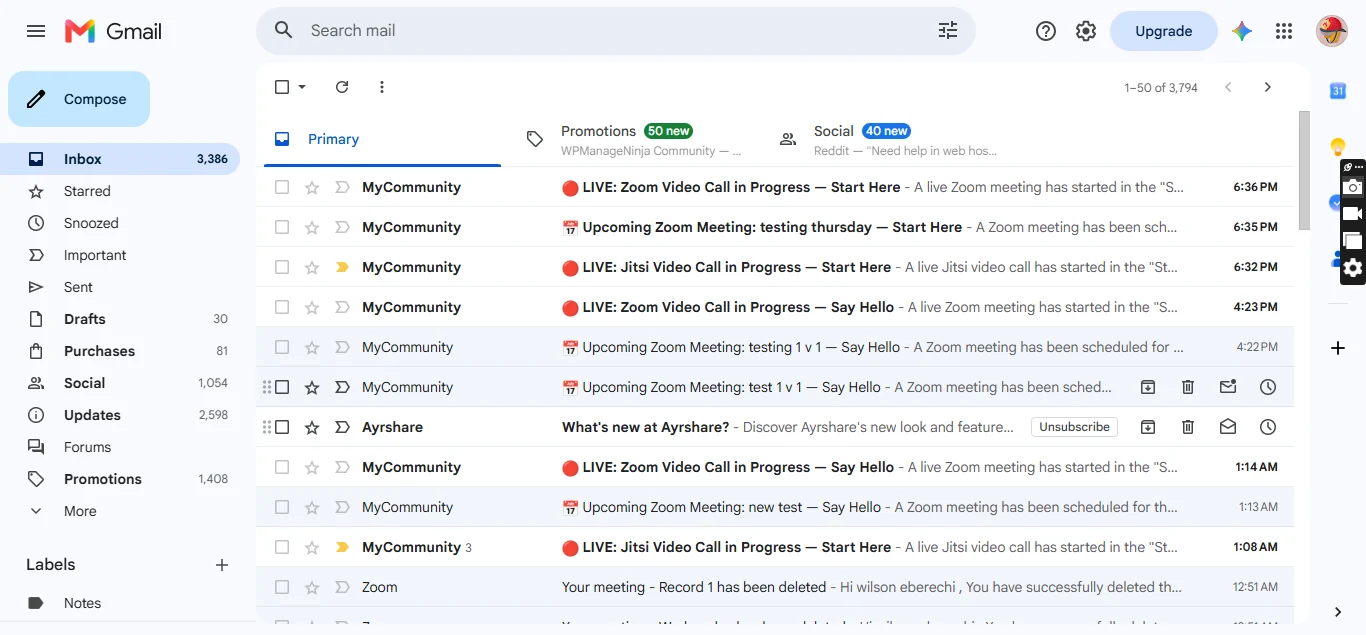
Image 4:
Why Choose FluentCommunity Video Calls ?
Unlike generic video plugins, FluentCommunity Video Calls is designed specifically for FluentCommunity.
It combines multiple conferencing providers, intelligent scheduling, embedded meeting experiences, attendance tracking, analytics, and creator monetization into a single solution that feels like a native part of your community.
Whether you're hosting a classroom, coaching session, private mastermind, company meeting, or community event, everything happens where your members already are—inside FluentCommunity.

Awesome! Any plans to integrate with fluentbooking and fluentcrm?

Debo Ogunrinde sorry for the late response, I was occupied.
I have never used fluent booking 🥹 but I use fluentcrm.
Could you tell me what features and how do you want it implemented with fluent booking and fluentcrm?
I'll have to install the fluent booking and see to your request.
WiLson Eberechi I maybe overthiking this....I currently manage my coaching calls (1:1, workshops and groups) with fluentbooking/fluentcrm/fluentcart and think it may be beneficial to host these calls in fluentcommunity. However, if your plugin is already integrated with fluentcrm/fluentcart and participants are getting notification by email, tracked in fluentcrm and can pay with fluentcart, it may be unnecessary to integrate with fluentbooking. Is this how the plugin currently works?
Debo Ogunrinde The only fluent product you'll need for this add-on is Fluent community(for video calls + analytics) and fluentcart for monetisation(live tips).
Email notifications are already wired inside this add-on, that when you scheduled a meeting(upcoming video call), start a live video call and get tipped, you and your members would be notified automatically by email and on space feed post and on that post comment.
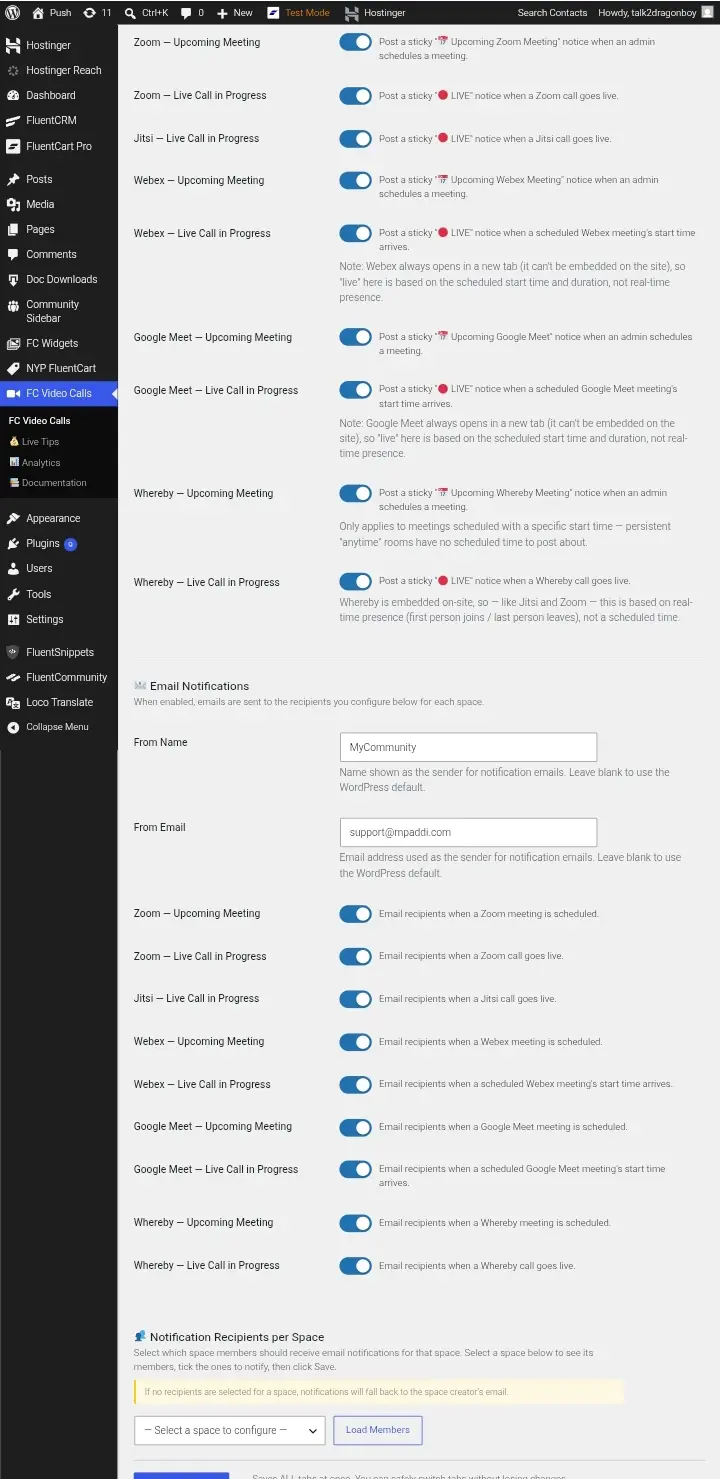
You can actually toggle on/off the required notification features you require and the message. So no fluentcrm needed for that.
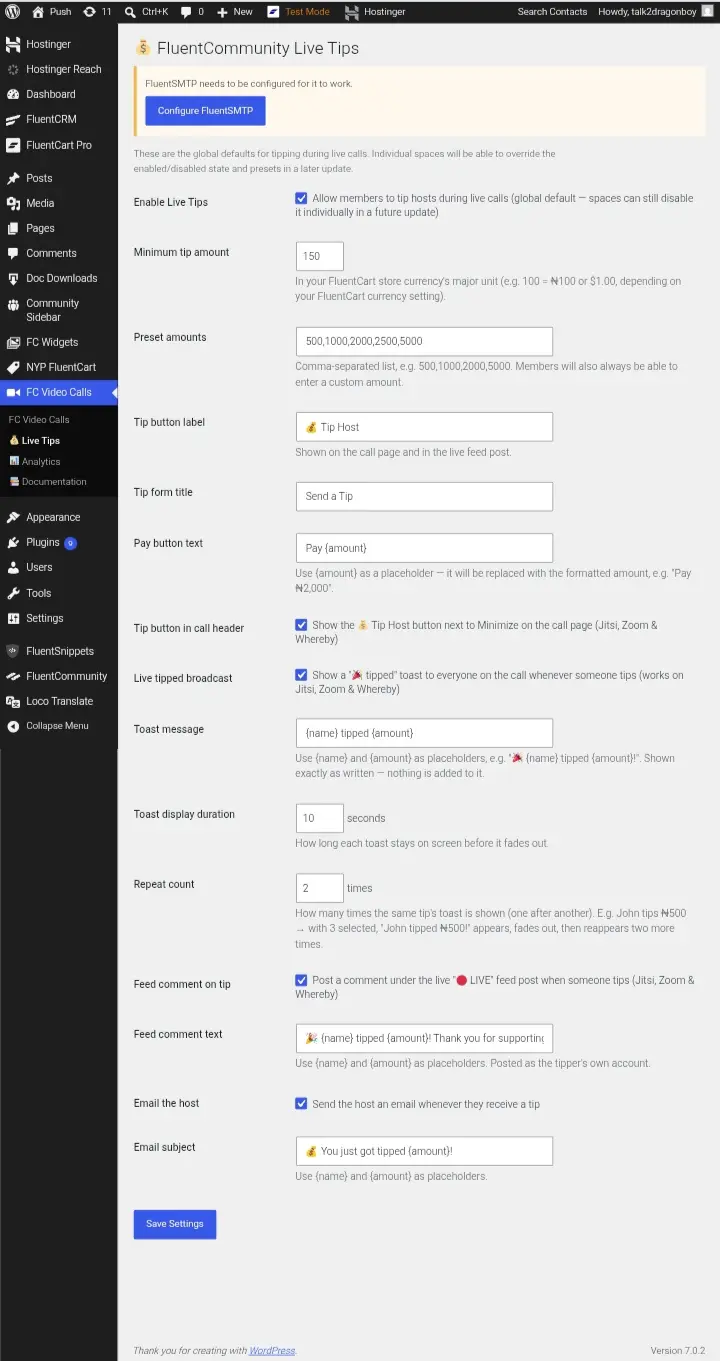
Debo Ogunrinde and yes, that's how it works🖤
WiLson Eberechi Thanks...do you plan to integrate with fluentcrm for tagging of contacts and follow-ups?
Debo Ogunrinde I will add fluentcrm to it, you and 2 other customers of mine who purchased this have requested for it.
Could you please, tell me how you want it to work.
Like map it out step by step process how you want it work?
WiLson Eberechi Thanks...Basically, to add in Fluentcrm, ability to add/update attendees contacts, tag registeration/attendance in fluentcrm and trigger automations. And for FluentCart extend live tip to to google meet and include ability to making an offer/discount during the call.
Debo Ogunrinde sorry for the slow response, I was helping a customer create a zoom account.
Okay, I'll start working on fluentcrm as per your request l.
Google meet, cannot be embedded, this is not from me, it's from Google meet team themselves. That's why I stated it it that live tips works specifically for jitsi, zoom and whereby. When you scheduled a meeting with good meet, and open from your space the video call does not stay in your fluent community, rather it opens a new tab, taking you directly to their official site.
Google meet didn't give permission for their video to be placed inside any site, same as WebEx.
Instead of using Google meet, why not use zoom, zoom can host up to 300-500 members for free.
And if you need assistance for getting auths or jwt or API for any of the video provider, always write me and I'll assist, as I have just got confirmation that a purchase was made by you.
I just want to make sure I don't disappoint you.
Debo Ogunrinde there's also other video providers that give permission for putting their videos inside fluent community, like: daily.co, livekit, agoro, I am trying to check each of them that charges very low, so I can add them, I am willing to add more video providers as well in next update.
WiLson Eberechi thanks...I do have a zoom account (free)...does his add on use fluentplayer?
Debo Ogunrinde Lovely. Use your meeting SDK keys and server to server oauth keys, I'm sure you know how to do this?
For fluent player, No.
Debo Ogunrinde I've mapped out the fluentcrm triggers I'll work on.
- create live tipper trigger,
- create member join video call trigger,
- create member left video call trigger,
- member completed video call trigger,
Those will be available soon and serve as triggers for fluentcrm.
Are those better or you need something else or you have more new features you'll want to be added?
WiLson Eberechi Thanks...Is FluentCRM able to add tags to existing contacts/add contacts that registered for video call?
Debo Ogunrinde that's where no 2 comes in, "create member join video call trigger,"
Set fluentcrm automation, where a contact join a video(trigger), action: assign tag(video-join-tag) to contact. So when that tag is applied(video-join-tag), add contact to space, course, send email, etc.
Is that it?
WiLson Eberechi yes and thanks! It will also be nice to be able to allow/disallow certain tags to register for calls.
Debo Ogunrinde how do you mean certain tags to register for calls? Kindly explain to me
WiLson Eberechi essential ability to sync information about users on each call with fluentcrm via tagging (directly or via automation) so that a view of a contact in fluentcrm would reveal a their record of attendance/non attendance.
Debo Ogunrinde I don't understand but as long as there's trigger, you can always assign tags and lists(automation).
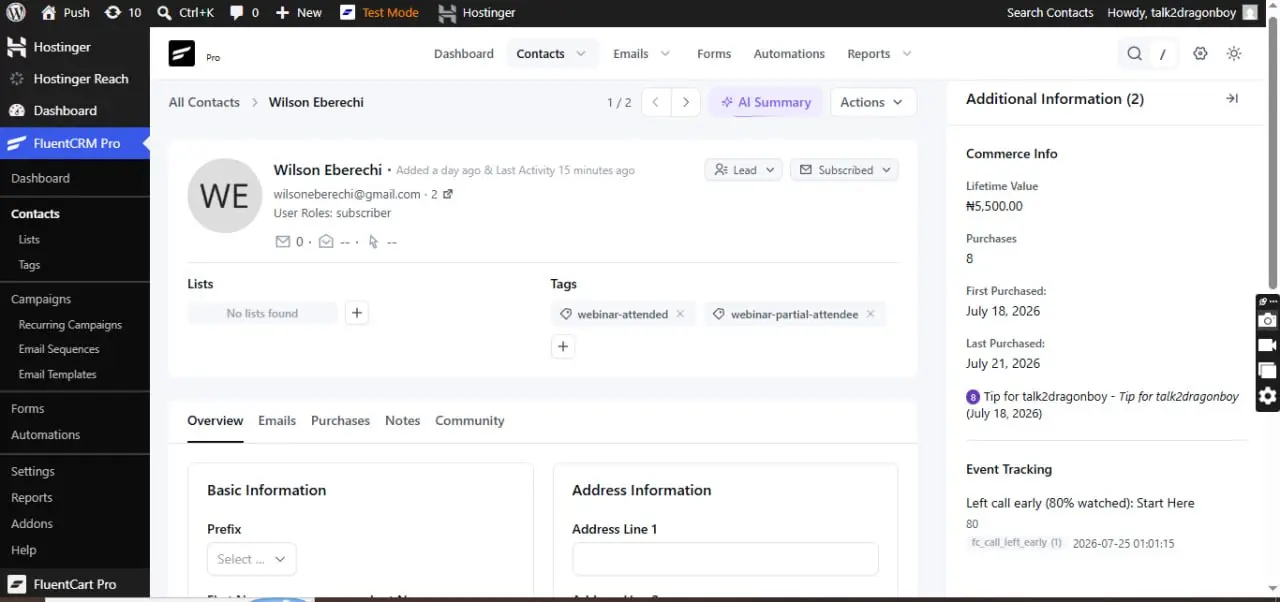
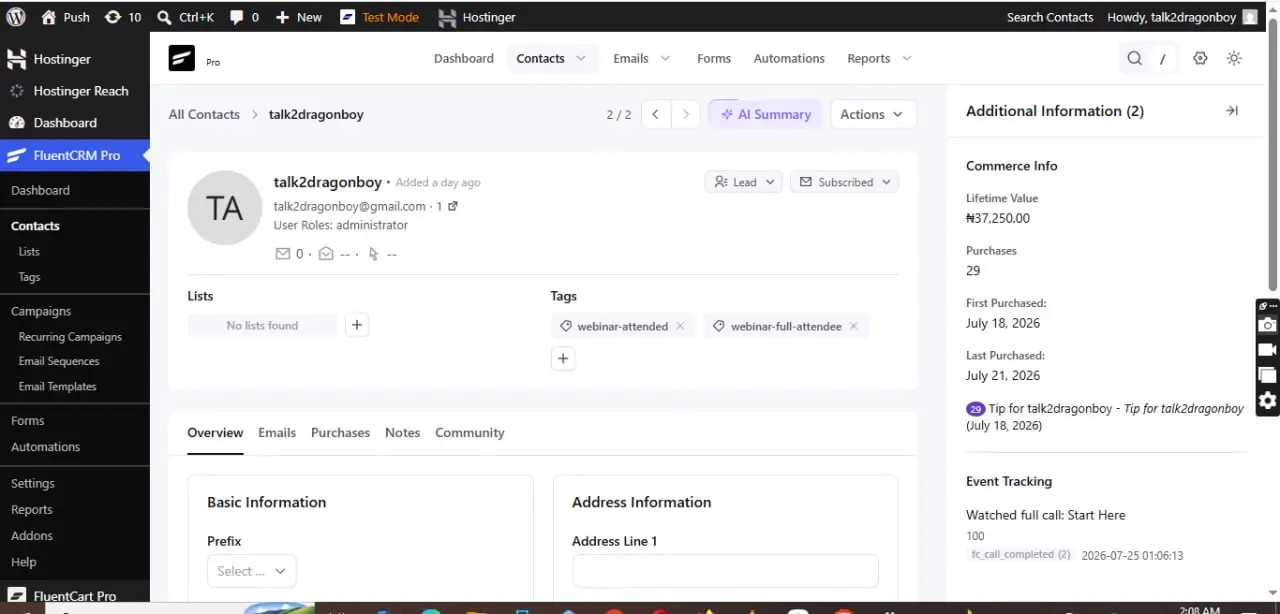
are you talking about the below, see images:
.
.
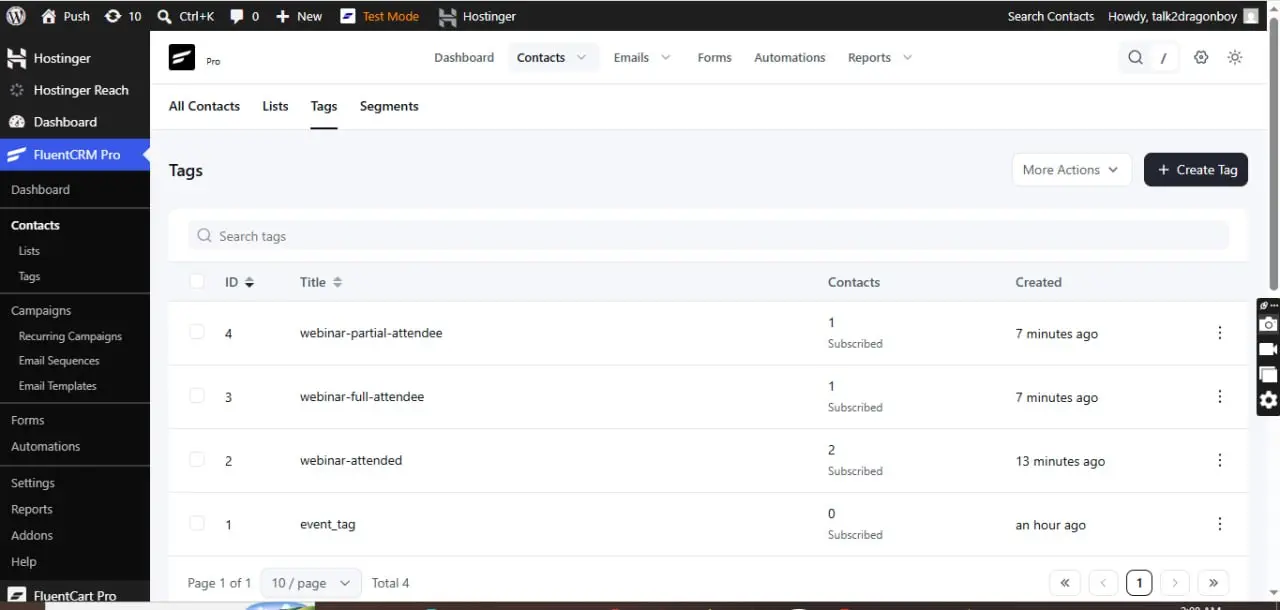
WiLson Eberechi You got it...thanks!
Debo Ogunrinde alright, it will be available on next update

Bought. Looking forward to making the most of it, and you, WiLson Eberechi , keep on shining!
Helmar Rudolph thank you. For any assistance always write me and I'll do my best to assist you. You've always been a good friend, thank you for all your efforts, you put on me.🖤

Would indeed be great if Fluentcrm eventtracking was possible, so you can send different message to people who attended the whole session, or people who left early.
Also, how about replays? Is this covered?
Natascha Vantuykom replays are covered by the video providers. So yes replays are covered.
I love the idea you just gave me now, could you enlighten me more on this concept, I like it, but I feel like I can grasp more.
So kindly enlighten me?
WiLson Eberechi you can add tracking to the video , fluentcrm has eventtracking buil-in, say video-watched-75% or something, then you know the person did not stay until the end and did not see your pitch. You can add this to a followup automation in fluentcrm and give a different pitch than the live one . Or something else 🙂
WiLson Eberechi would be great if replay links could be precreated or dynamically build so you can add them to fluentcrm automation emails
Natascha Vantuykom it's already in the plugin, analytics. Analytics tracks your video call, when live, when ended, how many members, total time, who hosted videos more, etc.
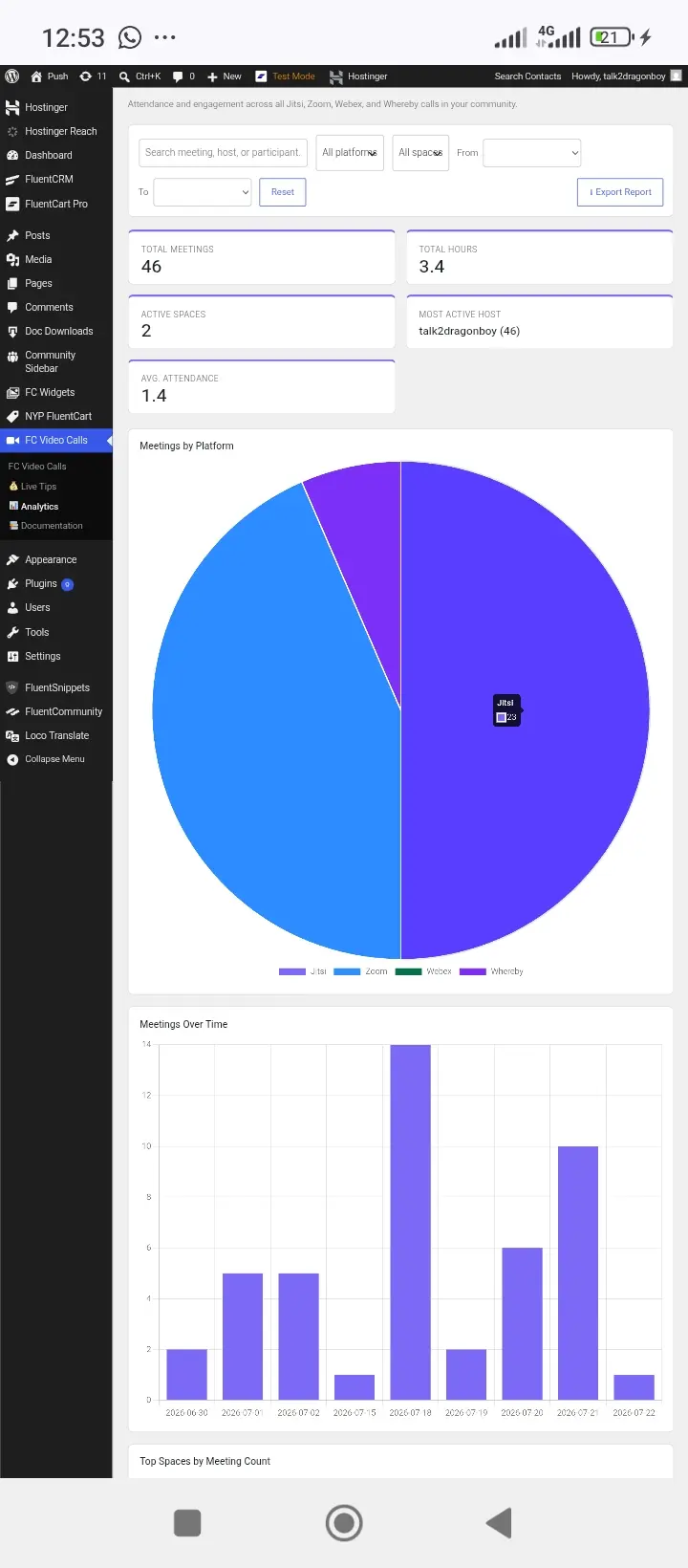
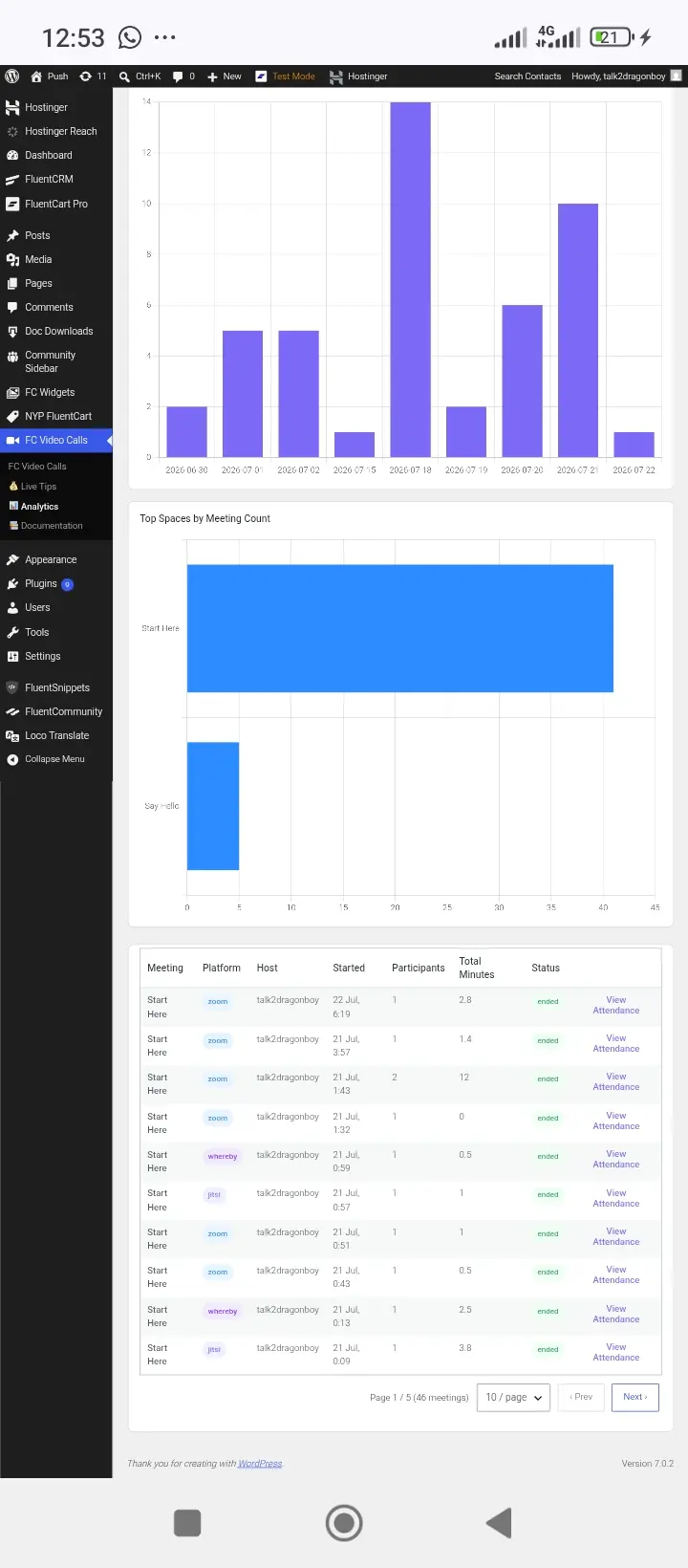
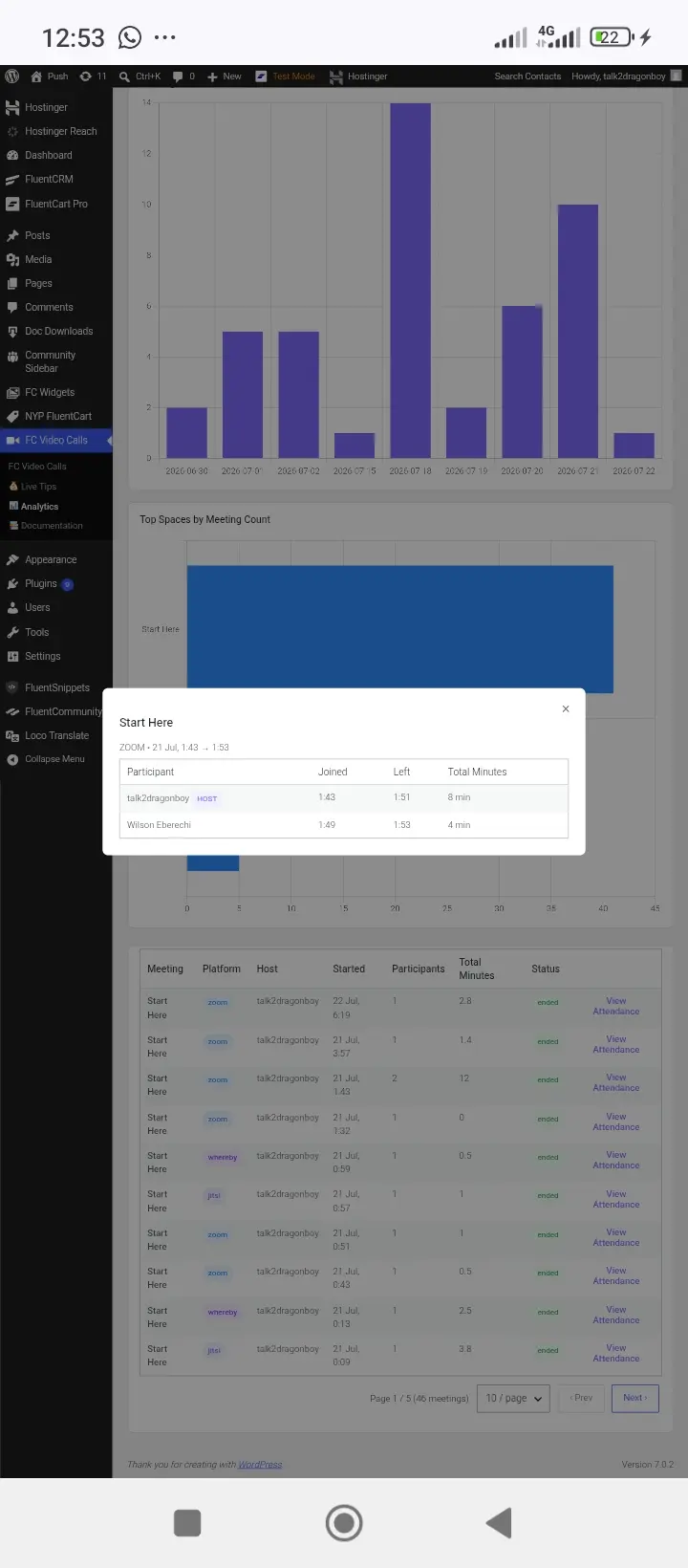
Natascha Vantuykom Natascha Vantuykom replay is not from my end, it's from the video provider you choose to use. But whichever provider that has replay videos will display on your feed post. Video providers with replays are jitsi, zoom, whereby, WebEx. I couldn't test Google meet, because I'm not living in America or Europe so it was difficult creating an account. But if you have an account with Google meet, it will work. I am also going to add more video providers where their plans are very very cheap, like whereby, daily.co , livekit, agora, videosdk, etc. their plans are so so cheap. I want this project to be a long run, with lots of cool features.
I will add fluentcrm for automation
WiLson Eberechi analytics can not trigger any automations, event tracking can
Natascha Vantuykom yeah, I'll be adding fluentcrm. Thank you for requesting this.
Natascha Vantuykom for almost 2 days, I've been writing codes. And I got this result, I want to know, is this what you are talking about, see the images, by the right side, event tracking:
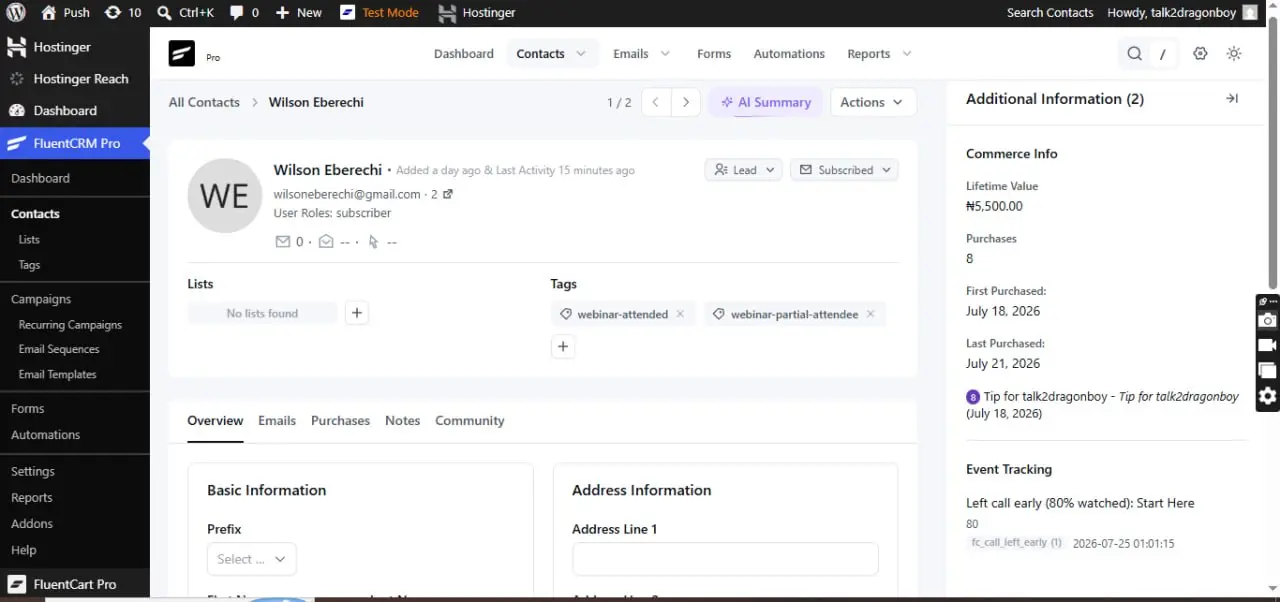
.
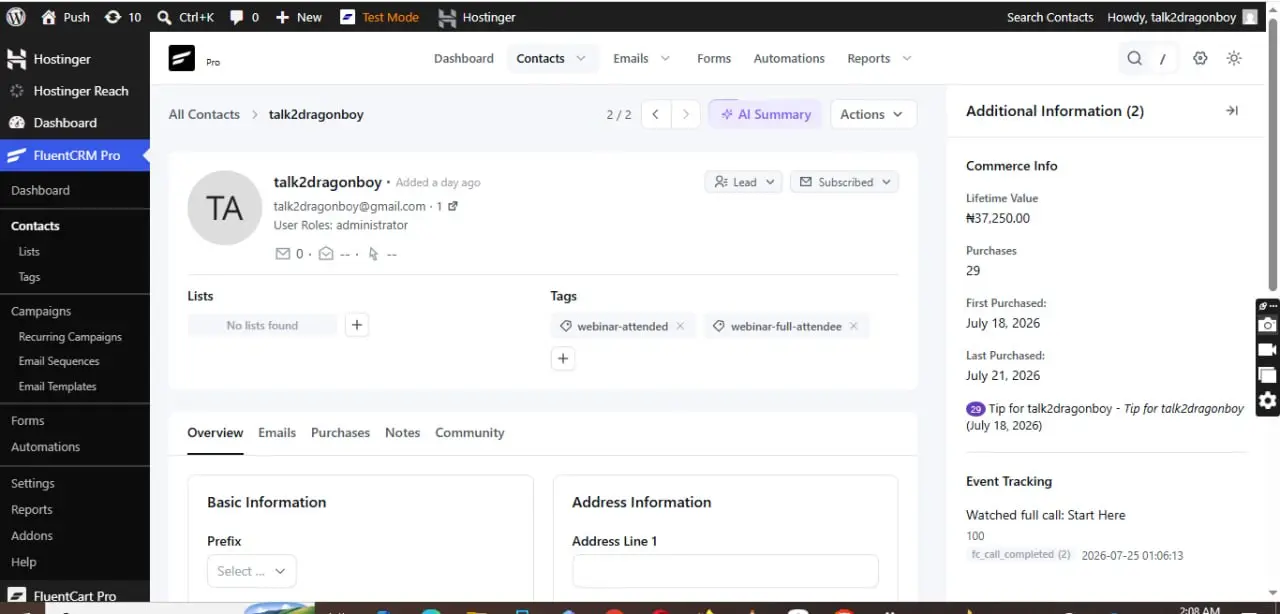
.
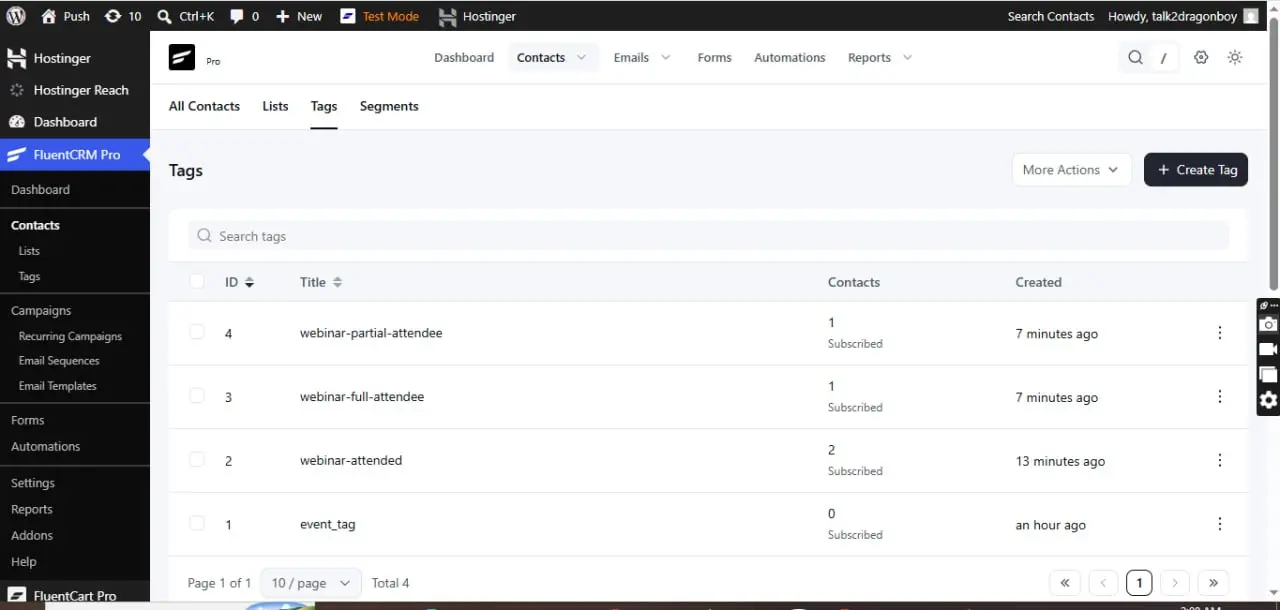
If it's not, could you kindly explain more to me, as I only use fluentcrm for automation(when a user sign up, add user to space and send emails), that's what I mostly use fluentcrm for.
WiLson Eberechi yes, exactly 🙂
Natascha Vantuykom alright thank you, it would be available on next update.

WiLson Eberechi Cool plugin! I'm trying to buy it, but it keeps failing when trying to process my credit card. I've tried several times with two different credit cards - Amex and Visa.
Teddy Skokos kindly check your DM

Same as someone else here I can't buy using my card. will not let me authenticate purchase with card provider.. thanks
Scott Hopkins I use Paystack, paystack don't accept some country's payment means. Kindly check your DM for Paypal payment. Sorry for the inconveniences
Just letting everyone know I purchased directly from plugin author with no issue. thanks.
Scott Hopkins Thank you Scott. Is there any new features, you would want me to add?

WiLson Eberechi Looks very impressive!
I also tried to purchase, but I can't use your payment stack. Can you DM me how to pay with PayPal?
Sella Yoffe kindly check your DM.
Sella Yoffe Thank you for believing in me and a successful purchase. Is there any new features, you would want me to add to the plugin?

I tried to pay but none of these buttons work (if they are buttons) on mobile. There was nowhere to input payment info. Please message me a Paypal invoice. Thanks!
Kaneisha G. you have to click the "place order", that's fluentcart.
Kaneisha G. kindly check your DM for PayPal payment. Sorry for the inconveniences.
Kaneisha G. it's misleading. These are not buttons to click on. They only show which methods are available. Room for improvement. 😄😄
Helmar Rudolph but where on the page do I put my payment info?!
Kaneisha G. on the following page. Just proceed.
UPDATE: FluentCommunity Video Calls v4.1.0 🎥📞🔴
What's New in Version 4.1.0
https://www.youtube.com/watch?v=94rmOtfsMq8
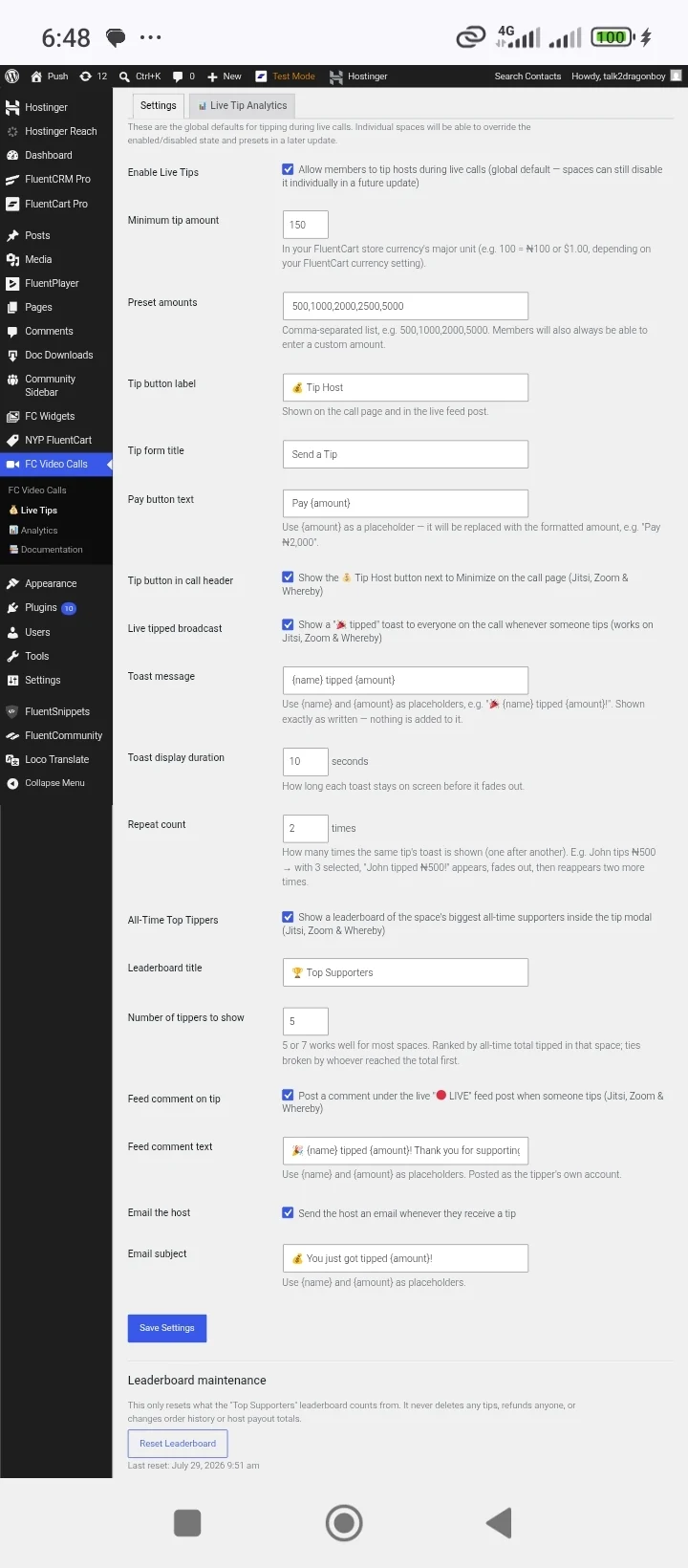
🏆 All-Time Tippers Leaderboard
Recognize and celebrate your community's biggest supporters with the new All-Time Tippers Leaderboard.
- Displays the Top 7 All-Time Tippers in a beautiful modal popup.
- Accessible directly from the Call Page header.
- Community administrators can enable or disable the leaderboard with a simple toggle.
- Encourages community engagement and rewards your most generous supporters.
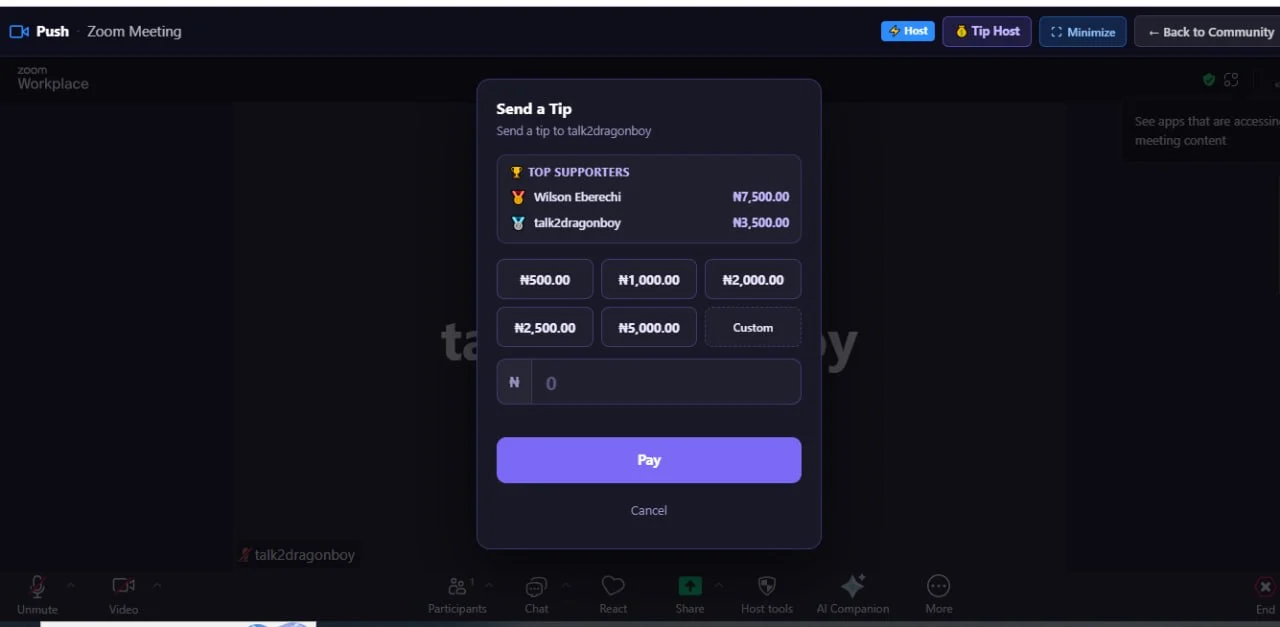
.
.
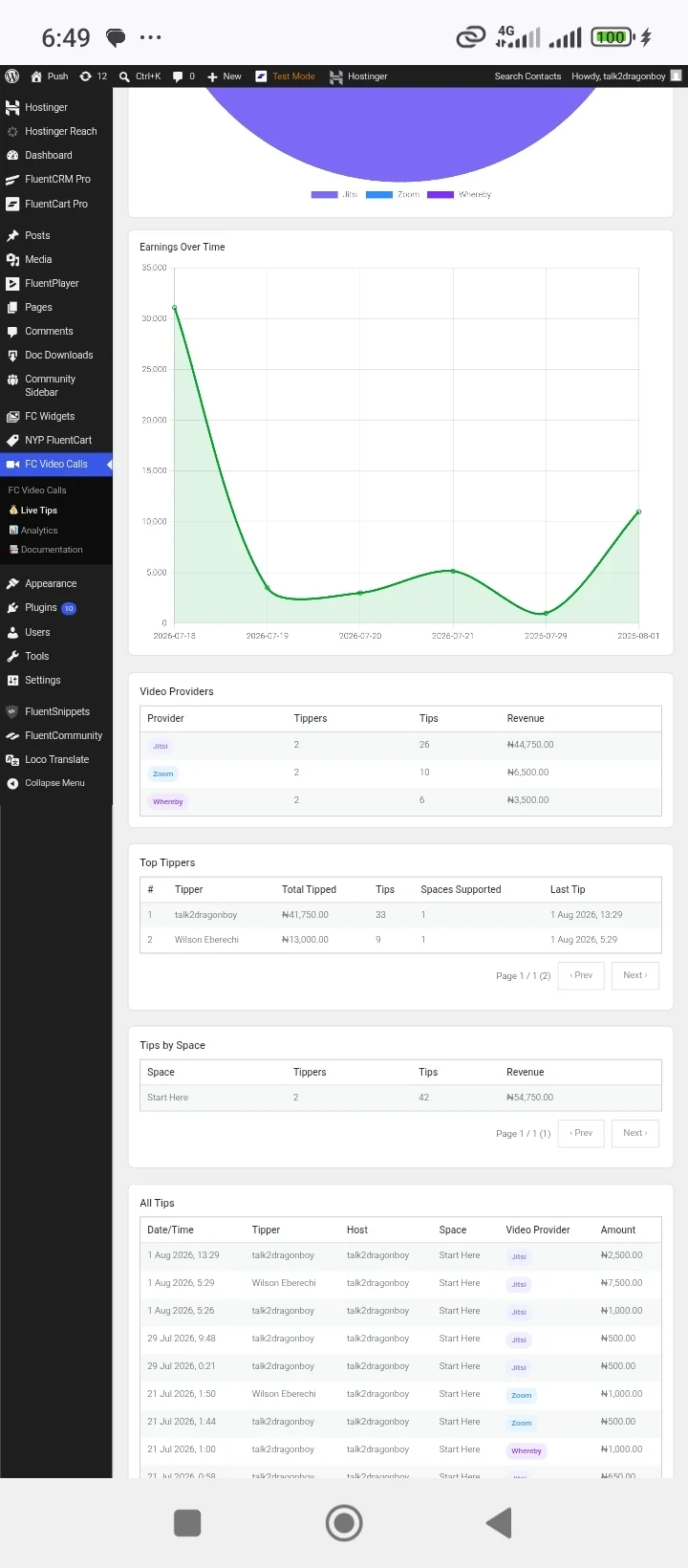
📊 Live Tips Analytics Dashboard
Gain valuable insights into your community's tipping activity with the new Live Tips Analytics page, available under the Live Tips menu.
Features include:
- Top Tippers leaderboard
- Total Tips Received
- Total Host Earnings
- Revenue breakdown by video provider
- Tipper statistics for each provider
- Interactive Pie Charts
- Revenue Trend Line Charts
- Date & Time tracking
- Advanced Search
- Filters
- Pagination
- Comprehensive reporting and analytics
.
⚡ FluentCRM Automation & Event Tracking
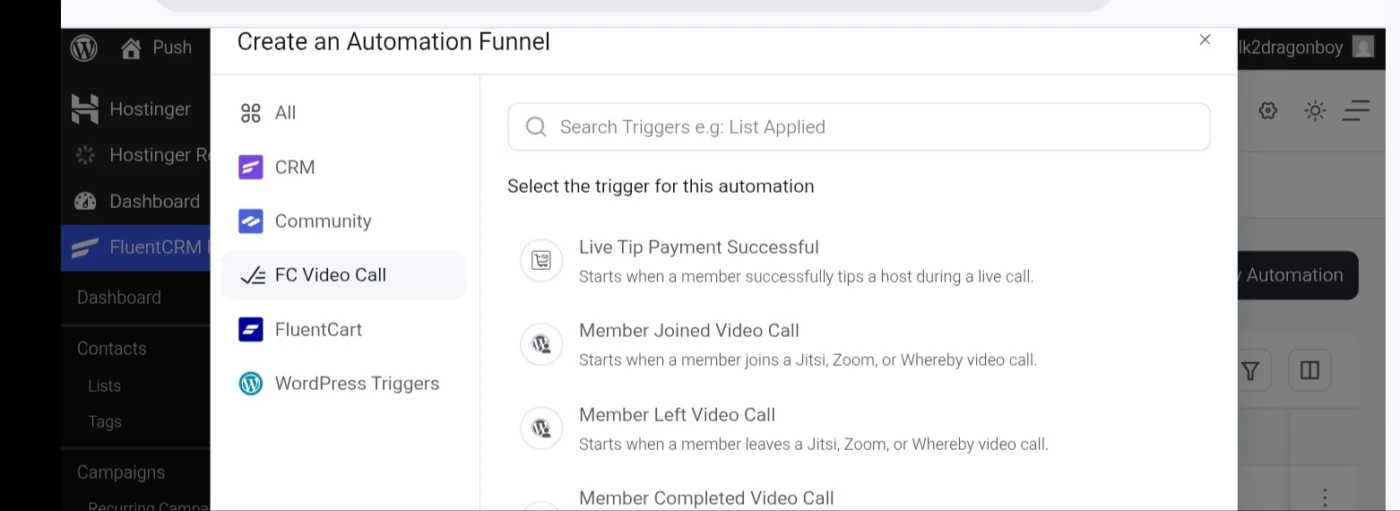
Take your community automation to the next level with deeper FluentCRM integration, including new automation triggers and event tracking.
New Automation Triggers
- Live Tip Received – Trigger automations whenever a member sends a live tip to a host.
- Member Joined Video Call – Trigger workflows when a member joins a video meeting.
- Member Left Video Call – Trigger workflows when a participant leaves a meeting.
- Member Completed Video Call – Trigger actions after a member successfully completes a video session.
.
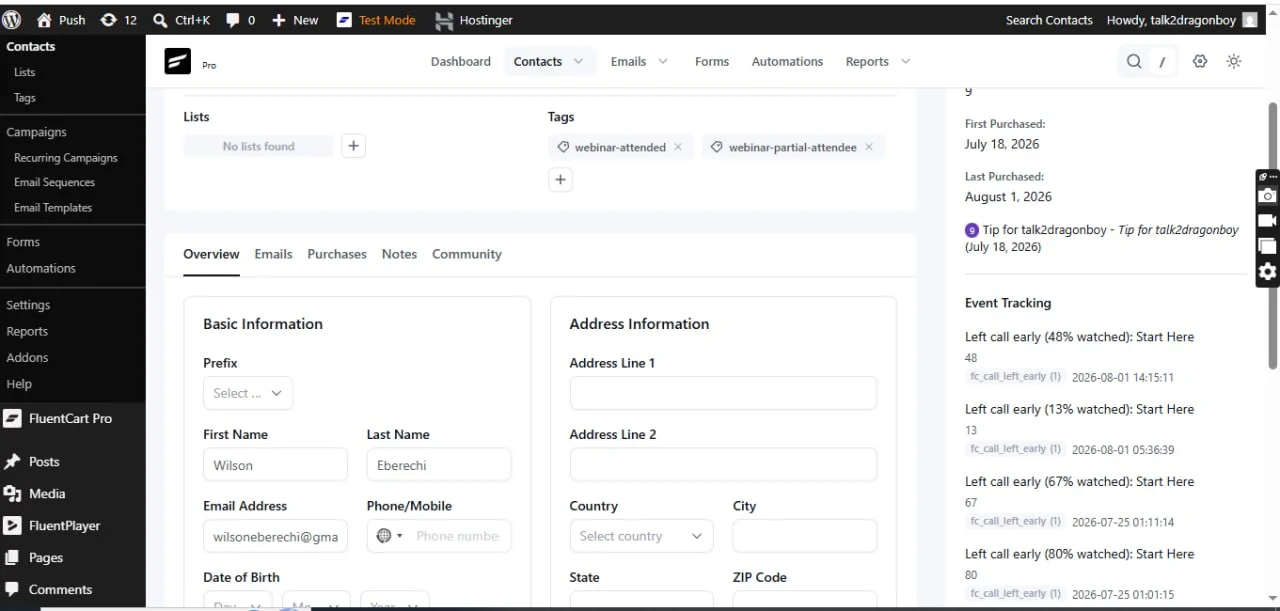
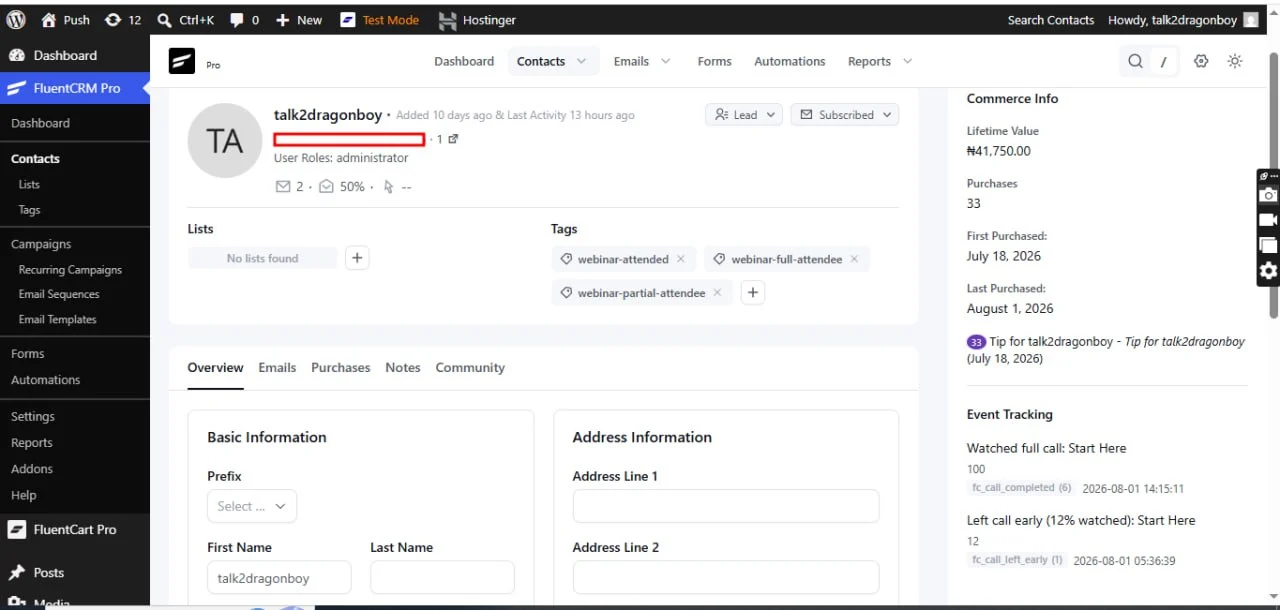
New Event Tracking
Automatically track important video call activities inside FluentCRM, including:
- Live tip events
- Video call participation
- Member join and leave activity
- Completed video sessions
- Meeting engagement history
- Contact timeline events for better audience insights and segmentation
Build powerful automations such as follow-up emails, targeted campaigns, contact tagging, achievements, onboarding sequences, and personalized engagement based on members' video activity and live tipping behavior.
.
.
https://www.youtube.com/watch?v=nZolSvG4TYE
For those who already have the add-on, kindly update directly from your wordpress plugin, and if you don't have it yet, below is the link.
👇👇Grab yours now
https://www.youtube.com/watch?v=jA-YaSh92SY
For Support: https://mpaddi.com

Hi, I can't pay via VISA card, can you send me a Paypal link?
Clemens Mazza Kindly check your DM.