

Feature Request: Customizable Tree Tab View
Overview
Can you enhancing the tree tab view by introducing color coordination and customization options for spaces, courses, and groups in the default install. This feature will improve user experience and make it easier to navigate and organize content within the platform.
Proposed Features
-
Color Coordination
- Assign distinct colors to spaces (green), courses (blue), and groups (red) in the tree tab view.
Tree Tab View Customization - Add icons to distinguish between different item types (e.g., square for spaces, graduation cap for courses, users icon for groups).
- Implement hover effects to improve interactivity and provide visual feedback when hovering over items.
- Develop expand/collapse indicators for items with children, allowing users to easily navigate the hierarchy.
- Assign distinct colors to spaces (green), courses (blue), and groups (red) in the tree tab view.
-
Customization Options
- Create a settings panel where users can choose custom colors for each item type (spaces, courses, and groups).
Benefits
- Improved visual clarity and organization of spaces, courses, and groups in the tree tab view.
- Enhanced user experience by providing intuitive cues to distinguish between different item types.
- Increased productivity and efficiency in navigating and managing content within the platform.
- Personalization options to tailor the tree tab view to individual preferences.
Implementation Considerations
Provide clear documentation and guidelines for users to understand and utilize the customization features.
Conclusion
Implementing this feature request will significantly enhance the user experience and provide a more intuitive and visually appealing way to manage spaces, courses, and groups within the platform. By incorporating color coordination and customization options, users will be able to quickly identify and navigate to the desired content, ultimately improving overall productivity and satisfaction.
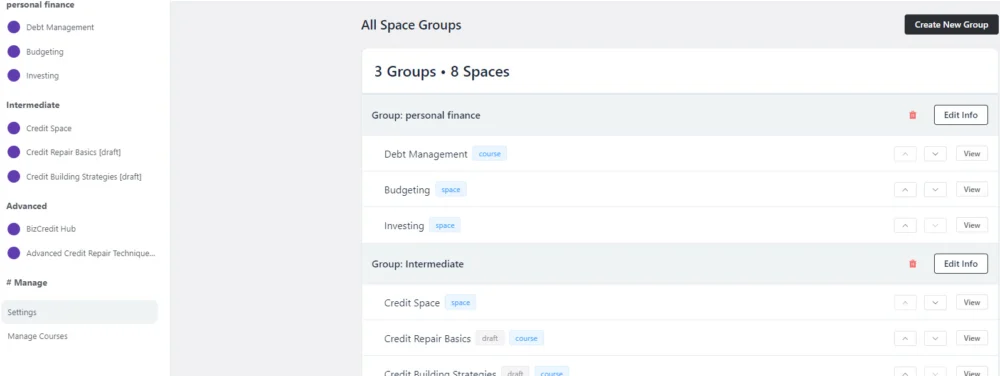

If you customise the Space settings, you can click on the icon and upload a custom image

The quick color coding feature for the tree tab view is an excellent idea, especially during initial build-out. Pre-set colors for spaces (green), courses (blue), and groups (red) will make visual differentiation easier without immediate image uploads.
Automatic color application to respective items saves time and ensures consistency across the platform. Retaining custom image uploads for spaces allows for detailed customization after initial setup.
This feature will improve organization and visual hierarchy during initial setup, providing immediate structure and clarity for navigating content.