

Emoji picker panel opens in the wrong position and is partially hidden
I am experiencing an issue when adding an emoji to a post.
When I click on the smiley icon, the emoji picker panel does not display correctly. It appears toward the bottom of the screen, making it partially or completely invisible. I have to click the icon several times for the panel to open upward so that I can see and select an emoji.
I will attach a screenshot to illustrate the behavior.
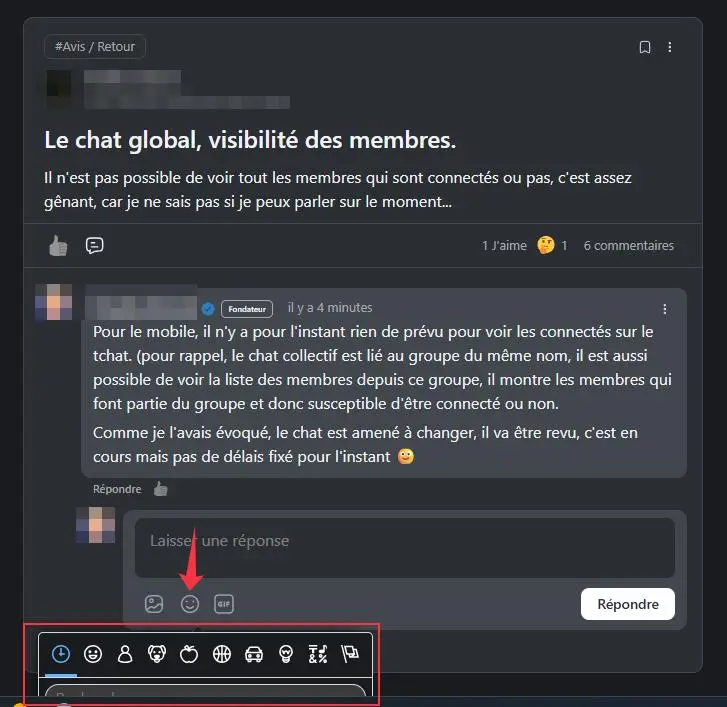

Ross FCA looks the number of likes as well the number 1 shows twice

Andre Gois The emoji picker issue is in core (happens here) and is unrelated to likes. Multi-reactions is mine though and you're correct RE the likes showing twice. Got a few changes to make to that.

Andre Gois : Thanks André, I hadn't even noticed...
Ross FCA : Regarding the emoji selector, I know it's here, that's why I posted here and not on FCA. My message helped to highlight this bug with multiple reactions, but that's off-topic here 😇

Hello, we are currently reviewing this issue.
Quick tip: Once the emoji panel opens at the bottom, try scrolling up slightly or closing and reopening it. You should then see the panel align properly and become fully visible. I wanted to share this workaround so you can continue using the feature for the time being.
And, we have updated the popover position for the feed modal in dev.
Tawsif Ahmed Riyad : Thanks for the suggestion, that's what I do personally, but the users in my community aren't aware of this and suggesting this tip to them would be "unprofessional" 🫣 Glad to read that the issue has been noted and will be resolved 👍