

Default Dark Mode for Fluent Community (without modifying the plugin)
After some investigation I found a simple way to make Dark Mode the default for new visitors without modifying any Fluent Community files.
Fluent Community stores the selected color mode inside the browser's Local Storage (fcom_global_storage). The idea is to set the default value only if the visitor has never chosen a theme before. Existing user preferences remain untouched.
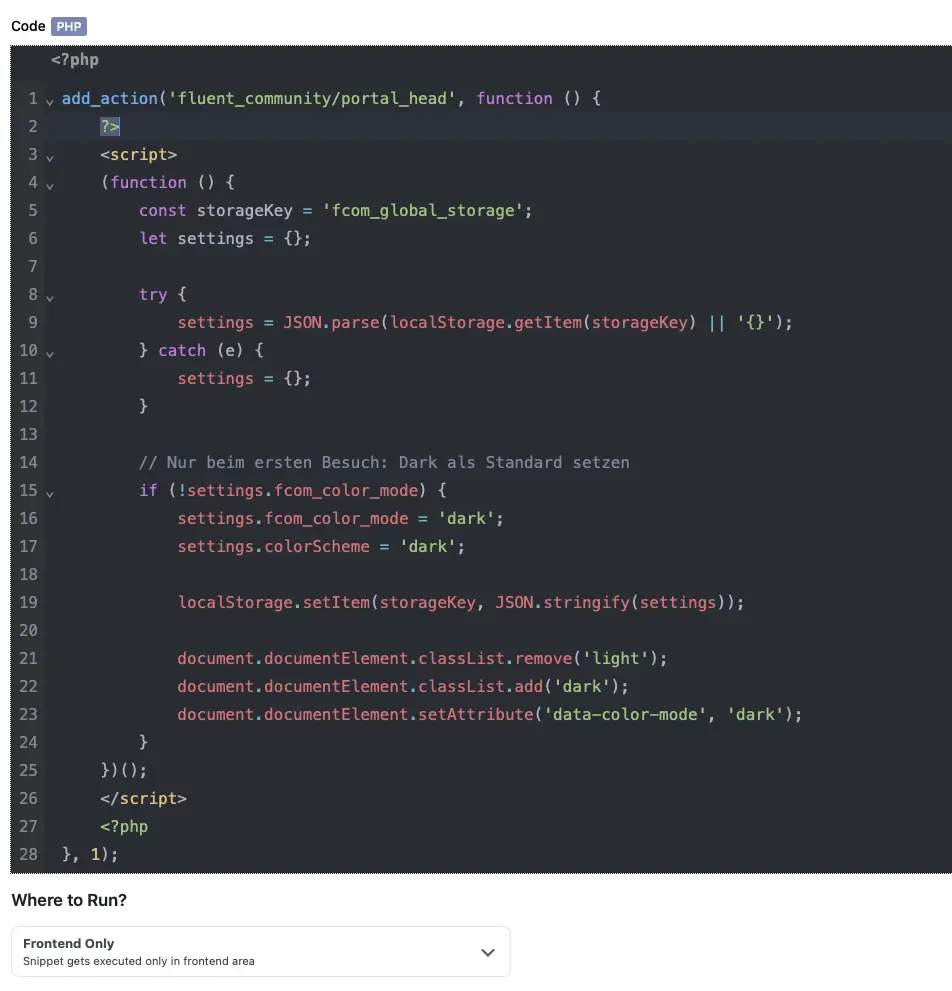
I used the following PHP snippet in FluentSnippet -> Screensho
The snippet uses the fluent_community/portal_head hook, so it doesn't require any modifications to the plugin itself and remains update-safe.
Behavior:
- ✅ First-time visitors start in Dark Mode.
- ✅ If a user switches to Light Mode, their preference is preserved.
- ✅ If they switch back to Dark Mode, that preference is also remembered.
- ✅ No plugin files need to be modified.
Maybe this helps someone else who wants to use Dark Mode as the default theme
Would it be possible to add an option in the Community settings to choose the default color mode (Light/Dark/System)? I think this would be a nice addition for future versions.

Thanks for raising it. We will look into it.

Where's the PHP snippet

Bryan William Look at the image please - because i cant post code here