

#critical #gdpr - Avatars keep loading from third party
Hello,
for better GDPR compliance, I disable the Gravatar service on all client sites by unchecking Dashboard > Discussions > Avatar Display.
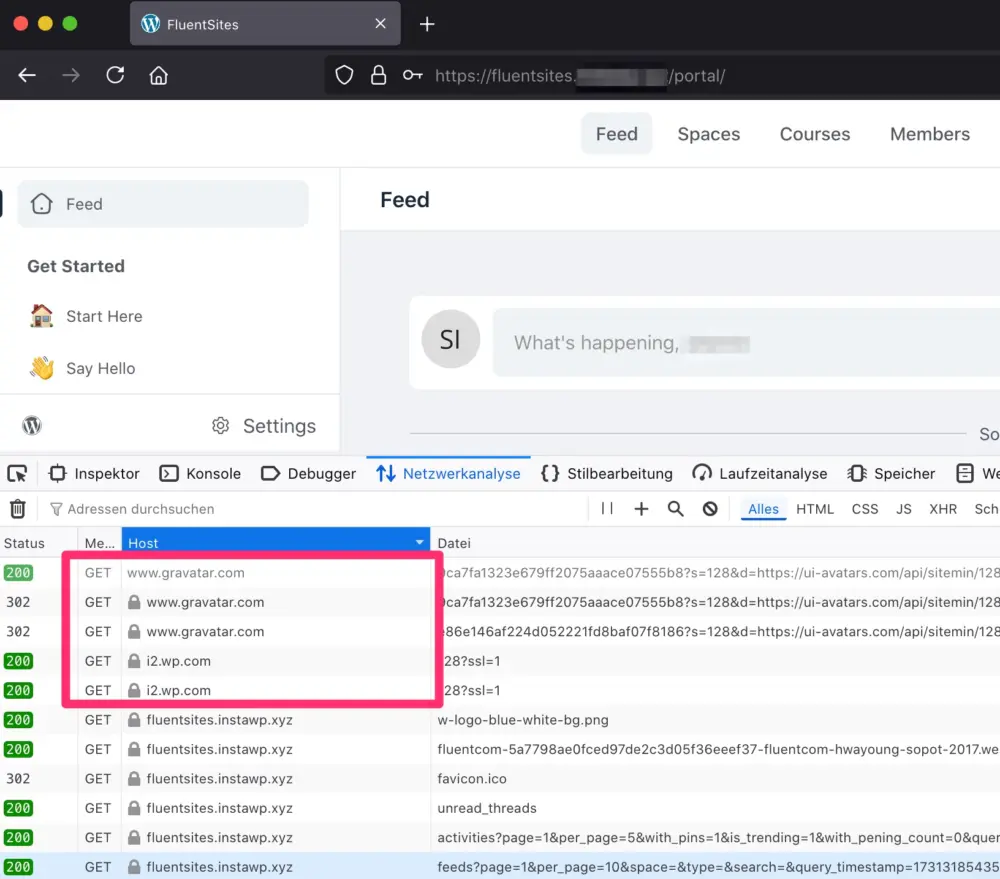
However, I noticed that FluentCommunity still connects to wp.com and WordPress's Gravatar servers when users navigate the portal (please see the attached screenshot).
Because of these connections, I’m unable to use FluentCommunity on either my own or my clients' sites, as we need to ensure full GDPR compliance. Could you look into this?
Thank you!

I'm not sure if I can call this; it is a bug. We will provide a hook to disable Gravatar.

Shahjahan Jewel, well, I think you're right, and I apologize for calling it a bug, as it’s not technically causing any 'errors'. However, it’s still 'critical' for me and my clients. I just wasn’t sure how to phrase it more accurately.

Shahjahan Jewel, if you upload on fluentcommunity profile page does it create a gravatar? Or is this for users that already had a profile or how does this work?
By the way, gravatar is a cookieless domain and it's just like a CDN. So not sure why you can't use it for your sites. I don't think it's against the GDPR compliance.
Shahjahan Jewel thanks for further consideration. I have discussed this a few times with our data privacy officer already: Unfortunately, Gravatar isn’t that straightforward when it comes to GDPR compliance.
Even without cookies, it’s about personal data: Gravatar uses hashed email address and IP-address, which still count as pseudonymized data under GDPR. Plus, since Gravatar data is sent to the US, that’s an issue after the Schrems II ruling unless there are extra safeguards in place.
Without an option to fully disable Gravatar or get user consent, I can’t use the plugin in a GDPR-compliant way.
Thanks for understanding!
We always try to avoid asking for users consent and prefer to keep our websites & webapps as clean as possible, with the lowest "privacy footprint" possible ;-)
By the way, under Article 6(1)(f) GDPR, third-party connections without user consent are only allowed if they’re essential for the service itself, like enabling PayPal at checkout. I strongly doubt that connecting to Gravatar or Automattic qualifies as an essential function here.

Shahjahan Jewel, Sascha Liem is right. It’s the same reason I keep nagging about fixing the Google Fonts issues in FluentCRM.

Sascha Liem, just adding link so interested folks can read it - not sure if it still the case but yeah.. #RainbowTables:
ref: https://github.com/olliebennett/getavatar.info
When a webpage contains a Gravatar user image, it's possible to extract the hash from this image URI and use it to request the associated profile information.
This would provide extra information about the user creating content (such as comments) on a site, which may otherwise not be shown. No unauthorised information is gained, as the profile data is openly available...

Gravatar and Google Fonts are so 2017 ... ;-)
I understand the devs, they like it, it is easy to implement.
But: for European Market (especially mentioned Germany) with GDPR there is no excuse anymore to use sth. like this if it is not essential.
Shahjahan Jewel - we have to filter this out. Not convenient for admins who like to work "out of the box" and maybe some are not so advanced to handle this.

On this topic. Karl Emil Nikka I don't allow users to Upload profile images. I Have a default image that applies to all users. I want to try and implement the same behaviour with fluent community if I can. The only time the Gravatar images shows is if the users is registered on Gravatar. It's my choice to show my profile publicly. It's my choice to add my profile picture to the community. I'm seriously missing something here.
Ryk Melck it all depends where you are located and how do you understand or care about user consent and user data.
It might be the case that I have one email address (just an example) and I use it for Gravatal service but when I sign up with your community I don't give any consent to display my Picture (this is my right to give thr consent not the Admin right - of course it depends where you have located your service but also where are your users are located).
Admin cannot assume that when user give consent to some external service tje Admin automatucally will take that external user consent as default consent for the Admin service and use it with his own community.
So when the user use only one email address everywhere it doesn't mean that you can or should link it to any external data set without the user consent.
Imagine that you provide your phone number here and the dev decide to link your phone number with any other data for profiling without your consent - and the phone numer was required here for the profile registering - it is just an example.
So it is always a good practice to give the decision to the user.
Not mentioning that there are ways to linked the user profile with some other assets and users might not want to display their pictures, profiles and any other personal data.
It's a long story but we might have a different opinions of course. Any Data Processor or Data Controller can elaborate on this topic #GDPR
Mat thanks for the detailed explanation. Adding the phone number is a good comparison. I'm based in the UK.
However, when I add my details to Gravatar.com, I'm fully aware that my profile image etc. will be used. I do not add extra details, so I can see where this might be abused.
But by adding my profile I'm fully aware that my image will be shown. so this is a really grey area.
Ryk Melck sure. So if you provided your phone number to yellow pages you don't have any issues with linking it to the community or anywhere else - I am fine with that.
Sometimes it's better to ask the DPO for the opinion and what are our responsibilities as data processor or what is sufficient user consent on our end and how we incorporate it in our privacy policy but yeah.
So if I want to be on Gravatal but not on your community and I have only one email address linked to both services would you allow me to hide my data including my profile picture on your community or you wouldnt bother because let's say your community is out of the box and doesn't allow any changes so there is no need to take care of such a small thing? I can blame Gravatar or the Community plugin developer but not the Admin in this case?
Other example (maybe even extreme haha): if someone shared public data on some portal I can embed it because the user has a Public profile and the user can delete the account on the other portal but as long as it is Public I can embed it and I don't need any additional content as long as the user have account on my portal etc (or even doesnt have it but since the user published the data a d it is available everywhere so why not on my web). As you said it'd a grey area...
No offence with this question... just asking for someone else opinion here.
Mat no worries. I'm in no way offended. I see your point of view. As for profile images, there is no way to set a spefific size. 100kb. I don't want to use uneccesay space where people are tring to load a 1MB profile pic of them selves.
Same as I don't get the point of a profile banner. For other it might be cool. I'm not going to visit all profiles and tell them how awesome or boring their banner image is. Again I don't see the point of adding unnecessary images that are going to take up space.
Their are no settings to set a required image size. correct me if Im wrong.
CSS for anyone interested.
.object_header.user_header .object_cover {
height: 60px;
visibility: hidden;
}
Shahjahan Jewel I have updated to the latest version (1.0.95), where the changelog states "Added Community Privacy Settings. Now you can disable global profile listing and restrict profile listing on specific spaces". This is not related to the issue of this post/thread, correct?
Current state is, that after updating to 1.0.95 all those connections to gravatar.com & wp.com remain active.
You said that you can provide a snippet in order to suppress connections. In case the snippet is ready, would you mind sharing it here with us?

Hi all, was there any form of solution to the Gravatar issue? I had a look through the changelog since this was first raised and there have been 4 updates, none if which address this issue from what I can see. I am trying to figure out suggestions where the community plugin is only using local avatars. It should render localised avatars, based on a meta key ideally to allow for membership and local avatar based plugins that offer these features. I added some ideas here: https://community.wpmanageninja.com/portal/space/community-meta/post/no-default-wp-user-avatars
Shahjahan Jewel - it would be great to get a solution to this. Bar the data issues associated with GDPR, the Gravatar service is effectively useless to anyone outside of the WP ecosystem. I also noticed is seems to be causing CORS issues across both this community, and my own local installations. The same CORS issues occur in FluentCRM contact profiles where it tries to use the gravatar service for 3rd party API calls. It would be good to get local support for avatars in FluentCRM as well so we are not reliant on the Gravatar service. Please see screenshot attached, thanks!