

BUG - Old communities directory now Spaces directory not being able to edit
Hello team.
I guess this could be happening too to some Beta testers. Anyone managed to fix it?
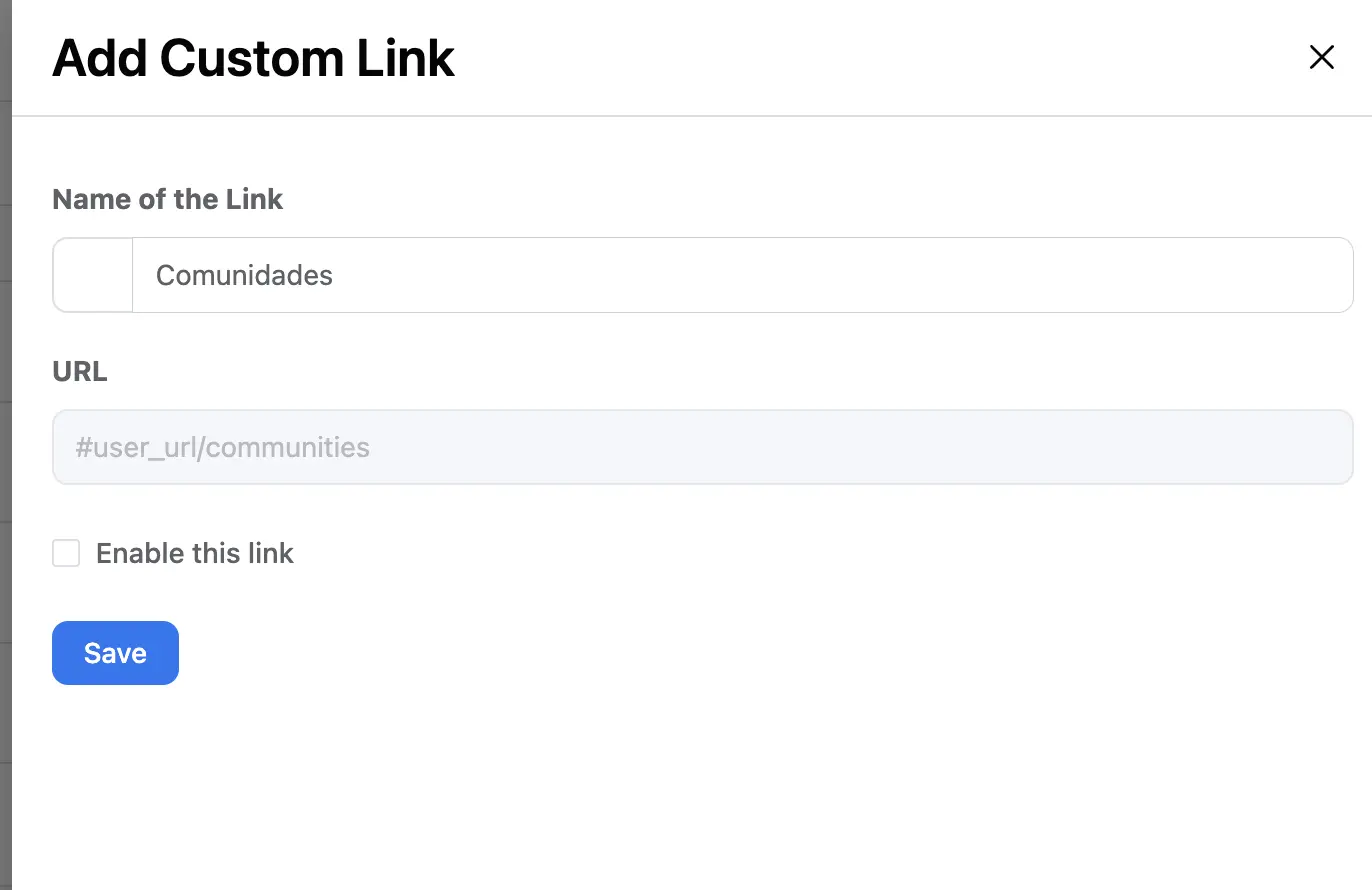
Basically, the profile dropdown option of "Communities" now "Spaces" is set to redirect to #user_url/communities
And not to "spaces" so it is not working. And redirecting to the profile. Making it redundant.
Any hint on how can I fix this URL?

Jorge de los Reyes You can do it directly in the DB similar (different table) to manual /slug correction - ref: link
I am not sure in which table it is sitting but use the Search field there:
`wp_fcom_chat_messages`,
`wp_fcom_chat_threads`,
`wp_fcom_chat_thread_users`,
`wp_fcom_media_archive`,
`wp_fcom_meta`,
`wp_fcom_notifications`,
`wp_fcom_notification_users`,
`wp_fcom_posts`,
`wp_fcom_post_comments`,
`wp_fcom_post_reactions`,
`wp_fcom_spaces`,
`wp_fcom_space_user`,
`wp_fcom_terms`,
`wp_fcom_term_feed`,
`wp_fcom_user_activities`,
`wp_fcom_xprofile`;
Mat will check that out! Thanks you. As always. Super useful!
PW.: I followed your orientation of CF+FAuth instead of wordfence 😄. Now, I am just thinking of the best practices for the WAF (Max 5 rules) taking into account I had to disable bot protection due to it blocking some important paths of Surecart and webhooks that were being treated as bots 😅. Any ideas?
I went for, basically for:
- Omitting known bots and IPs
- Blocking malicious processes
- JS for admin and login out from country
- Block empty user agents
Jorge de los Reyes don't forget that you can combine rules there and use OR operator so you can have more complex rules.
Example: you can use 1x WAF rule for couple of conditions with OR statement + mixed with AND operator. So 1x rule can be utilized for Blocking request. 1x rule for Challange etc
But don't go crazy long expressions.
With CF you won't get DDOS or dummy request to overload your server so it's a plus.
You don't have to block all traffic but you can also Log (Skip option) attempts only (so nobody will see but you can analyze the case) or use a challenge option.
Jorge de los Reyes you can
- Block: country = Tor OR
- Block: url path contain /roundcube /webmail /phpmyadmin AND country is not in YourCountry (if applicable) OR
- Block: url path contains xmlrpc.php or install.php or readme.txt or install.txt if you don't use it or you don't want scanners to discover some details etc
- Challange or Log/Skip continents Asia Africa or any other with high risk (don't block it so crawlers or other services won't be blocked completly)
- Log/Skip: url path contain /wp-admin AND outside your country so you can monitor who and if is trying to access your Admin area - then you can analyze it if you suspect bad actors
Note: if you are unsure if you can Block some request then use Manage or Skip option so you can analyze the best configuration for your case (don't forget to keep the correct rules order so they work as expected)
Note: you can disable caching (Cache Rules) for some urls like /wp-admin or other widgets if this is your case
If you use your hosting for your website and your mail it is possible to discover your server IP and potentially skip CF - so don't forget that and that is why I recommend to have installed at least BBQ Pro (LTD) plugin and Blackhole Pro (LTD) - both are cheap and very good. The second one is not a must.
Ps. For blocking bots be careful so you won't block any legit crawlers and for webhooks maybe don't block it with CF routes yet but start with a plugin where it will be much easier to control what routes you want to publish - check this plugin: Disable REST API (unfortunately if you will have Public fCommunity or some integrations you need to know what you are blocking or if its worth to spend time figuring out what is blocked etc)
Mat Thank you Mat. This is super smart advise! Already implementing all of your ideas!