

Bug: Default "Feed" menu icon not updating on Desktop (Sync issue in settings)
Hi everyone,
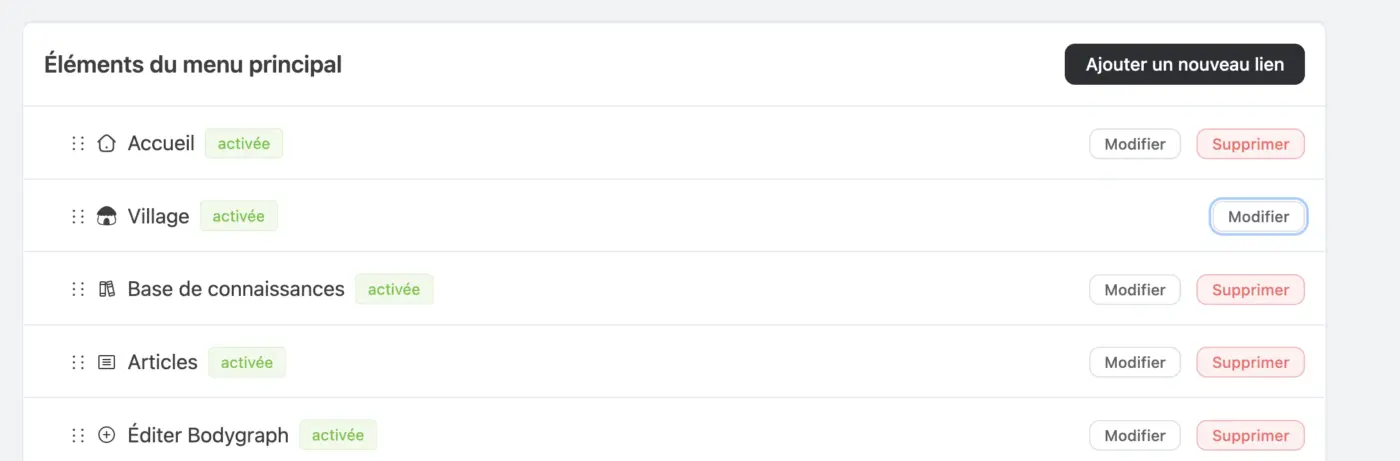
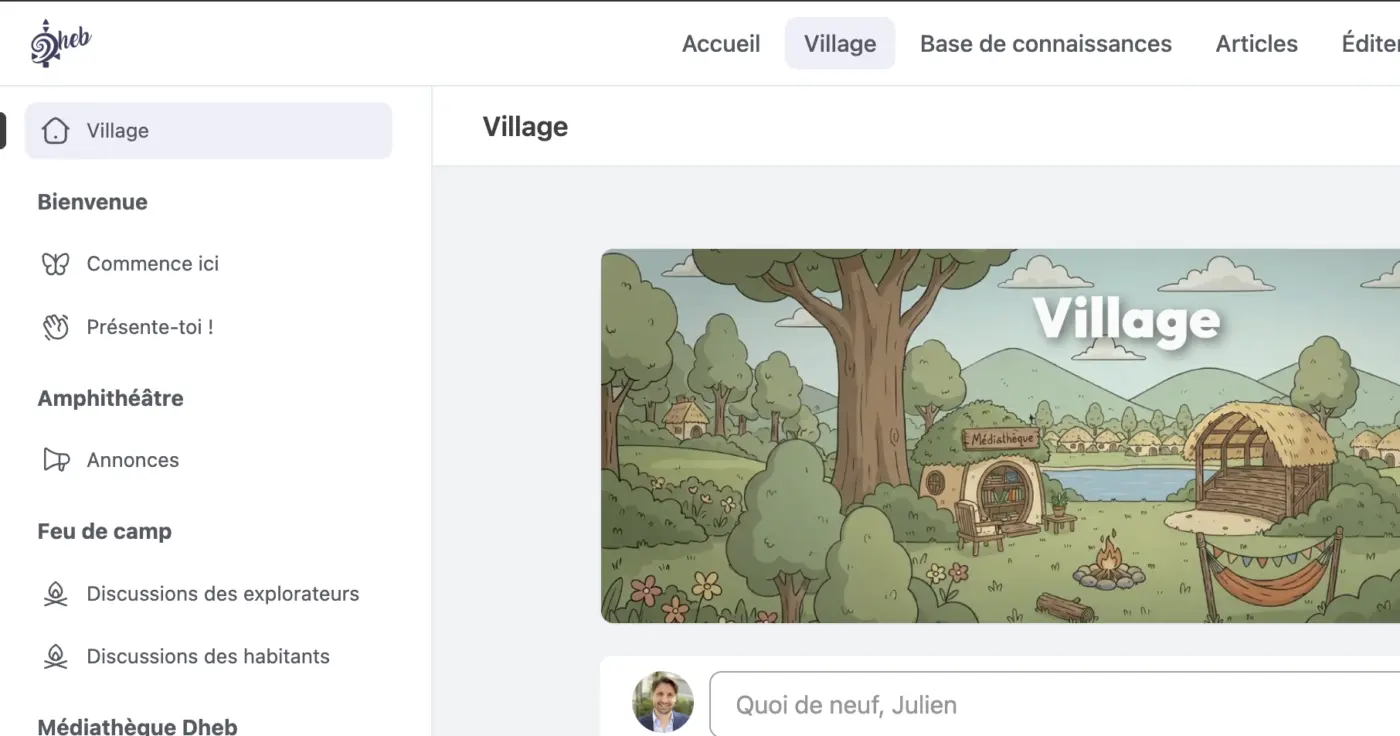
I am facing a persistent issue when trying to change the icon for the default "Home/Feed" navigation item (which I renamed "Village").
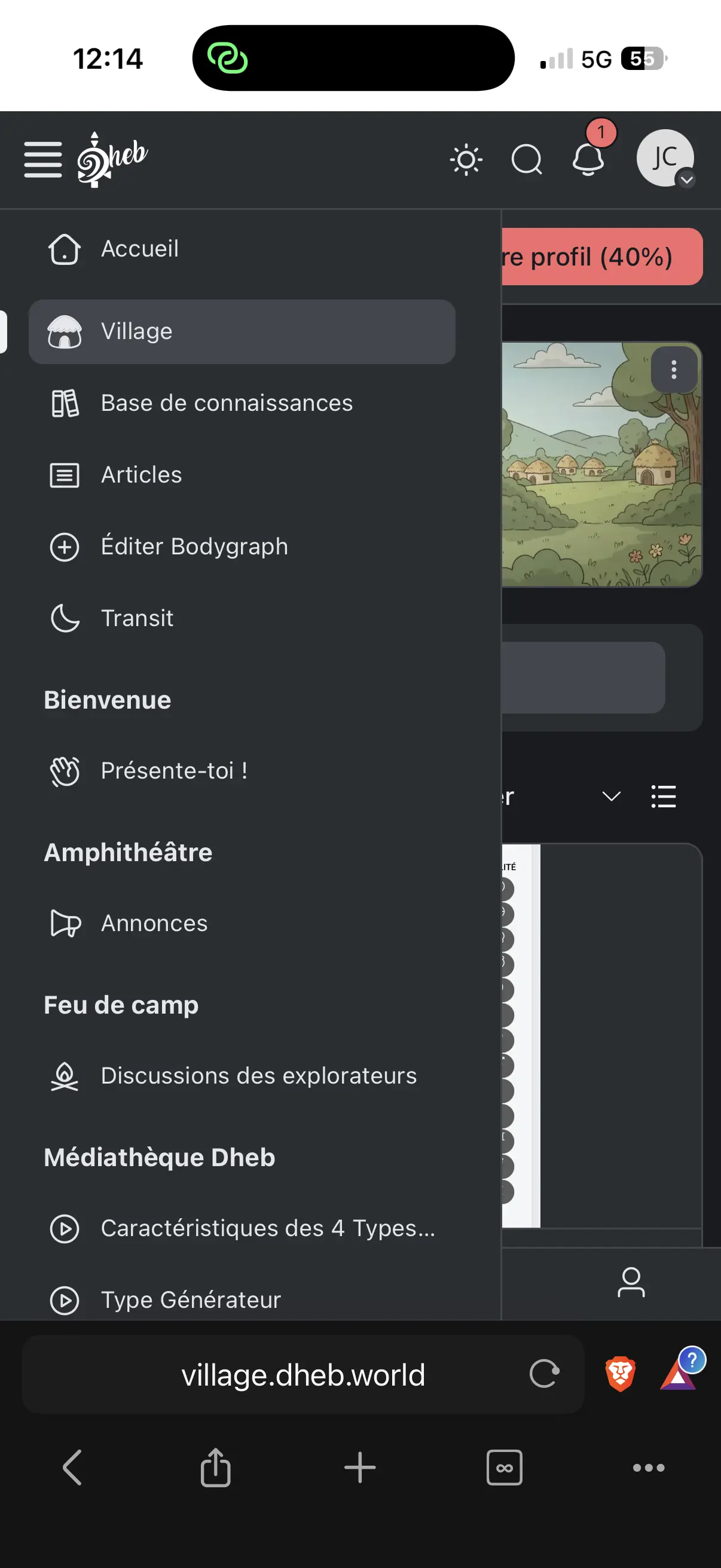
I have changed the icon to a custom one (a hut), but the change is inconsistent:
-
Mobile: The correct new icon is displayed.
-
Desktop: The old default "House" icon persists.
-
Backend Settings:
- In the Menu List view, it shows the correct new icon.
- However, when I click Edit on that specific link, the internal setting still shows the default "House" icon.
It seems like the "Edit" modal for the default link is not syncing or saving the icon change correctly for the Desktop view, even though Mobile picks it up.
Has anyone encountered this? Is there a way to force the icon update for this system link without hiding it and creating a custom URL manually?
Thanks!

Julien Cros Can you please check if the show icon settings is enabled?

Raiyan Marzan I don't want to display the icon in my top menu, but that doesn't matter in my case. As mentioned, the icon set for my ‘Village’ feed does not appear in my side menu.
Julien Cros Got it. Noted, thank you!
Hi Julien and everyone,
I had same need and have a solution that is pretty easy to do. Here are the directions I created:
Problem: Want to change the label and icon for the Feed, and have it all consistent across top and left menus and on mobile. (see image I attached that shows the feed as "Community feed" with hurricane icon on top menu and left side top. On mobile, it shows the top menu items first, and the group menu below the "Get Started Preparing".
-
Change Top Menu feed item
- Menu settings
- Primary menu items
- edit the feed item, changing the label and icon
- NOTE: This ONLY controls the feed in the top menu, not the left menu feed
- Review site in incognitio mode - should see change in top feed item only.
- review site on mobile. You will see your new feed item at the top of the mobile menu, with new label and icon. old feed is in display:none
-
menu asettings
-
Top Links (at sidebar)
-
Add a new link
- I made my label say "Community Link" and changed icon to hurricane
- NOTE: When you first create this link, a new CSS class is created. It stays this, no matter if you edit the label later. This is important. If you want to change the class later, you will need to delete and redo this step with a new label creating a new class.Using
- Save
- Review the desktop site - you will see your new feed item, with new label and icon, under the old default feed/house icon. Review mobile, your mobile menu will have your top menu items AND below those there will be a duplicate of your "Community Feed" and it's icon. Not what you wanted but will fix below. Note that the old default feed does not show on mobile because the \
- for it has a class called
fcom_desktop only
-
optional but a learning experience: use your browser dev tools and inspect the desktop left menu - your will see the desktop only class on the old feed item, you will also see your new community feed with its custom CSS class
-
fcom_menu_item_fcom_custom_community_feed (the community_feed will be your label)Note: if you are interested, in dev tools you can actually look at the fluent CSS file called global.css and see how they implement the Fcom desktop only . I adapting to our custom link CSS,
-
Customizations
-
Custom CSS
- Add the following CSS code - make sure you use the class with your label text, not my example.
-
/* *********************************** */
/* added a top link - to replace the feed - but need it to not display when on mobile */
/* Fcom adds this class with the label at creation of link label */
<a data-user_name="media" class="fcom_mention fcom_route" href="https://community.wpmanageninja.com/portal/u/media/">Media Rocketeer</a> all and (max-width: 1024px) {
.fcom_menu_item_fcom_custom_community_feed {
  background-color: green; /* just to debug before you add the none line below */
  /* display: none!important; */  /* uncomment this line to hide on mobile */
}
}-
I suggest if you want to see what is happening visually before causing the display none to kick in, you can / / the display line, and since I have the background color changing the new left side feed item to turn green, you can see what will be affected.
- You will see that the new community feed is different that both the old left feed and the new top feed you modified. It will only turn green on mobile, looking normal on desktop.
- we are doing the Media Rocketeer at the top of our CSS to trigger this just like Fluent global.css did for their CSS.
- Once you are ready to not display the new left feed on mobile only, just remove the / / from around the display none. Just use the code below:
/* *********************************** */
/* added a top link - to replace the feed - but need it to not display when on mobile */
/* Fcom adds this class with the label at creation of link label */
<a data-user_name="media" class="fcom_mention fcom_route" href="https://community.wpmanageninja.com/portal/u/media/">Media Rocketeer</a> all and (max-width: 1024px) {
.fcom_menu_item_fcom_custom_community_feed {
  display: none!important;
}
}-
confirm that it is hidden only on your mobile. If not working, inspect and make sure your custom class for that new left feed you created is correct in your CSS code.
-
The final step is to get rid of the original Feed with the house icon. It still shows up above your new link on desktop.
-
Customization
- Uncheck the "show default feed link in left menu"
- save
- Now review your site on desktop and mobile. It should look great!
-
I hope this helps anyone in the future. The devs may add some simple checkboxes at some point you the menu settings and/or customization to give a little more control over what shows up on desktop/mobile. That would be nice :) They could also sync the feed in the top menu with the default feed in the left. Just some thoughts. But we can get same effect with the above.
Good luck,
Jamie
Raiyan Marzan Is there a native way to simply update the icon for this default system link without using Custom CSS hacks?
Jamie Robe Thank you for your reply, but the method seems complicated to me (creating a new link, hiding the old one, and using CSS code to hide duplicates on mobile devices). It's a lot of work to set up.