

Adding new members via email
Shahjahan Jewel, I recall there was a thread about adding new users via email address being removed as an option.
The last comment I saw was that it was removed by mistake and was going to be added back??? I've not seen any changes in the available options in the last couple of updates. 😟
It was there in earlier releases. It does make adding new members (a lot more) awkward without it.

Wesley Peace This option is available under Add Member section.
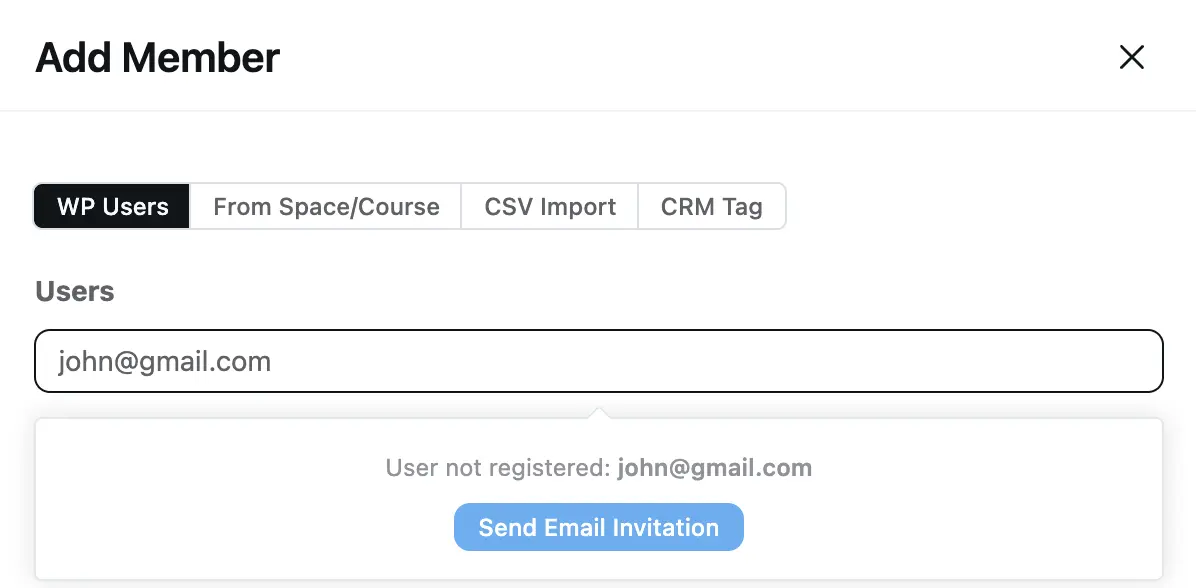

Raiyan Marzan, I know that is there. On earlier releases there was an option to send an email to an individual, someone who had did not have an account. That was removed.
Shahjahan Jewel acknowledged it was an error and said it would be restored.
Now the only way to add new people is to create an invite to send an email.
For example, you want to add newuser@someaccount to the site. I now have to generate an invite, open my email account, and send them an email message.
Beforehand, you clicked "invite," typed the user's info, and the system sent the invite.
If that functionality was consolidated under "WP User," then it is not clear. "WP User" means a WordPress user, someone with a WordPress user account.

Wesley Peace
Thanks for your concern. Yes, it may be confusing to put the under "WP User" rather it should have a separate tab for invite users.
But, the functionality is still same. If you want to add newuser@someaccount to the site,
- Open the add member dialog
- Under the "WP Users" -> Click on the Users Input
- Put the newuser@someaccount email
- It should popup with "Send Email Invitation" button since the user is not available to your site.
- Click to send invitation.
No need of manual open email account and send email message.
However, we are considering the issue to make it more user friendly and visible.
Md. Ariful Islam, yes it is confusing. It was a separate option initially, and now it's under an option labeled "WP Users." ⁉️
I doubt anyone knew it was there.
Wesley Peace Thanks for understanding it. I hope now it's clear to you. We will add a separate tab/space to invite users in next release.