


Just want to voice my appreciation to the team for the tag- and list-wise reporting added in this release!
This is a massively useful feature for the company I work for, and removes the need for a lot of hacky manual work we regularly do.
Thank you Shahjahan Jewel !

I currently have a client that is using Fluent CRM, and also GiveWP. Some of the data that they want is not really exposed easily in Givewp, and the only way to get some of that data is through webhooks, custom functions, and database tables, and it's still not a perfect solution. Does paymatic expose most of the data such as recurring dontations, lifetime value, etc to FCRM easily? If so, I'd like to replace give with it.

Hello smart people,
I need some help…
What I’d like to accomplish:
When someone opts into FluentCRM with a specific tag, I want to start an automation that send a few emails first then schedules emails on specific dates. However, if the person buys a WooCommerce product before those dates, those emails shouldn’t be sent.
I’m sending a lot of emails, so I’d prefer not to add too many conditions — and even with that, I don’t see a way to make this work.
I must be setting something up incorrectly.
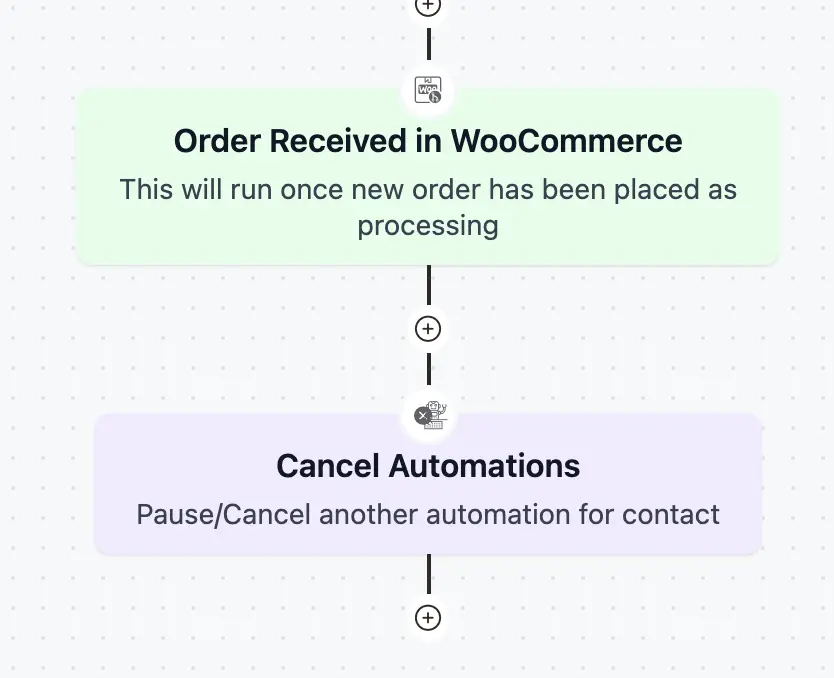
I’ve added the goal “Order Received in WooCommerce” as an essential point, and after that, I’m cancelling the automation.
It seems like the automation is cancelled, but those scheduled emails are still being sent.
Could someone guide me to documentation that explains this, or simply point out what I’m doing wrong?
Thank you so much for your time!

Hi, i would like to update a card on FluentBoard when a contact gets updated (e.g. change contact stage in the board, or update contact title etc).
Is this something anyone at WPManageNinja is working on? I don't want to start custom coding if this is going to be in a future release :)
Thank you!

Hi everyone,
I’m having an issue while trying to update FluentCRM Pro — the update fails with the following error message:
PCLZIP_ERR_BAD_FORMAT (-10): Unable to find End of Central Dir Record signature
It says the package could not be installed.
I’ve tried updating directly from the WordPress dashboard, but it keeps failing.
Has anyone else encountered this issue?
How can I fix or manually update FluentCRM Pro without breaking my setup?


Hey Shahjahan Jewel!
I know for now you're focused on FluentCart's launch (best wishes!!!)
I already updated FCRM 2.9.8, and I LOVE the improvements/fixes.
I appreciate you added the feature I requested about sorting email campaigns from open rate and click rate columns, BUT they're not working properly for now.
Maybe somebody of your team can look and fix it.
We can sort by broadcast (date), recipients (qty) but when try to open/clicks, sorting is not working for now (video attached).

Is it possible to have a page to view selected user posts ( Blog style ) and also the ability to display this in WordPress so that user can click on it to view more in the community.

Is there way to set an automation TRIGGER to run on the 1st day of every month?
All I can find are ways to pick specific days or wait X days, which can't quite get where I need.

Hi,
Is there a way to delete the WP User account of a contact in FluentCRM when I delete that contact from Fluent CRM?
Maybe a code snippet? The support offered a Hook to build the snippet but it is not working in this scenario.
Appreciate your help.

Hello! I was wondering if anyone has been able to integrate FluentCRM with any event plugins (with ticketing)? Thanks in advance!