

Ok, todays comments and findings...more to come
-
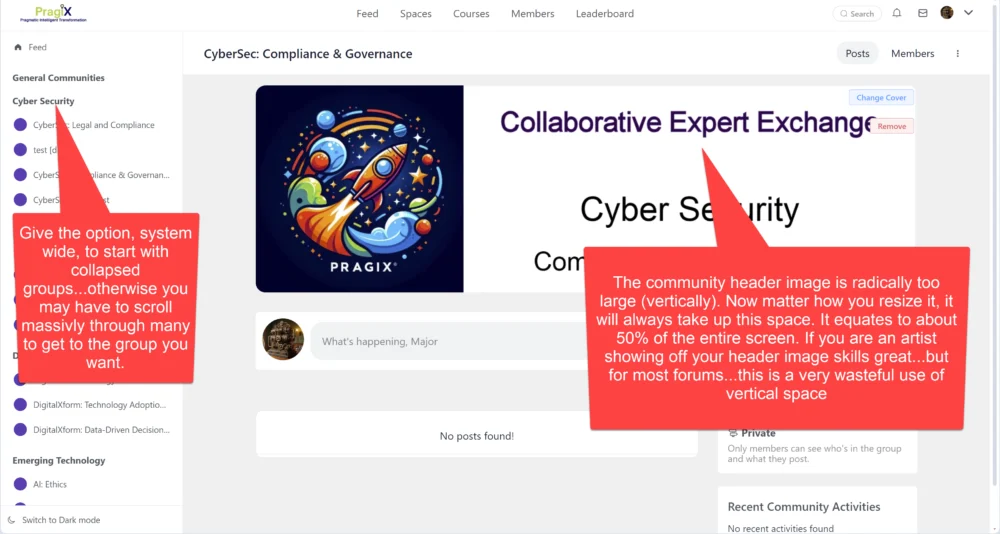
space header images eat up 50% of total available vertical space (no matter how you size this image). this should really be reduced as it creates a poor user experience.
-
Groups should begin collapsed. Imagine if an org has 30-50 spaces...people will be scrolling up and down the page to get to the correct space. Groups are the perfect initial vies...show them...and then allow a person to expand the group. Alternatively, create a collapse all / expand all button at the top
-
Again, the register must give the capability to either use an alternate registration screen from a different plugin...or at least populate that alternate plugins data...do register a user. My example is Memberpress. This is widely used, and serves other purposes...so the two plugins have a reason to coexist.

Also...please recognize my posts are done with deep admiration of what has been already created. The goal is to offer constructive feedback to a wonderful development team.

Hello Bruce Hafner, Thanks for the detailed feedback. Here are my responses of your queries:
- Header Image: To make the design consistent. The image ratio is fixed so that ratio can't be changed unless you add custom CSS to over-write that.
- I think most of the sites, will not have tons of groups and that's why we have decided to keep it open by default. The preference is president by browser so once you collapse a group, it will stay in that state. We will check if we can make a collapse all / expand all button. The thing is, I want to keep the UI super minimal so add any new elements is hard.
- We did not work much on the onboarding flow. But we do have a a nice automation integration with FluentCRM automation so you may use the automation to add / remove from spaces.

Shahjahan Jewel, ad2 - I can imaging a case where an Agency work with many clients and they want to streamline communitcation with them especially working on some projects (the want to get rid of facebook etc and keep the communication on their own server).
So in this case it would be nice to dedicate each Group per Client/Client Category. Of course we can have just a few groups (Regular, Premium, VIP) and assign clients under those but it depends on a case.
BTW: It would be nice to have automation for creating a Group and/orSpace for a New Clients etc.